The Problem
It starts with configuration sprawl.
I was building a project and kept switching between three code editors — VS Code, Cursor, Windsurf. Each one handles MCP servers differently. Each one has its own config file format, its own way of specifying credentials, its own quirks around which MCP features it supports. If I wanted to use the same MCP — say, a PostgreSQL query tool — I configured it in Cursor's mcp.json, then again in VS Code's settings, then again when I opened a different project. Every new project, every machine switch, same configuration from scratch.
But configuration sprawl is just the surface problem. Underneath it, there are four deeper ones.
MCPs are isolated islands. You install five MCPs — a database, Jira, Slack, GitHub, a monitoring tool. Each one works on its own. But there's no orchestration layer. You can't say "query the database for recent errors, then if severity is critical, create a Jira ticket, then post a summary to Slack." Each MCP is a standalone tool with no awareness of the others. The composition has to happen in your head, manually, one tool call at a time.
MCPs are trapped inside code editors. The MCP ecosystem is powerful — but it only works when a developer is sitting in an IDE. Your Discord bot can't call an MCP. Your webhook can't trigger one. Your scheduled job can't use one. Your API can't expose one. The tools exist, but they're locked behind an editor window that has to be open on someone's laptop.
There's no observability. When an MCP call fails, you get a cryptic error in your editor. There's no log trail, no execution trace, no way to know which team member hit rate limits or which tool is slow. If your AI agent made a bad decision three tool calls ago, good luck debugging it. There is zero visibility into what's happening across your MCP infrastructure.
Credentials are a security problem, not just an inconvenience. Every MCP needs secrets — API keys, database passwords, tokens. I had them scattered across .env files, ~/.config/ directories, hardcoded in local configs I kept telling myself I'd clean up. When I wanted to share an MCP with a teammate, the only option was sending raw credentials over Slack. There was no way to give someone tool access without giving them the actual keys.
Agents can't build on this. An AI agent can use tools it's been given. But it can't browse a marketplace, discover a useful MCP, install it into a workspace, wire it into a workflow, and deploy that workflow — all autonomously. The entire MCP ecosystem is human-configured. Every integration requires a developer to manually set it up.
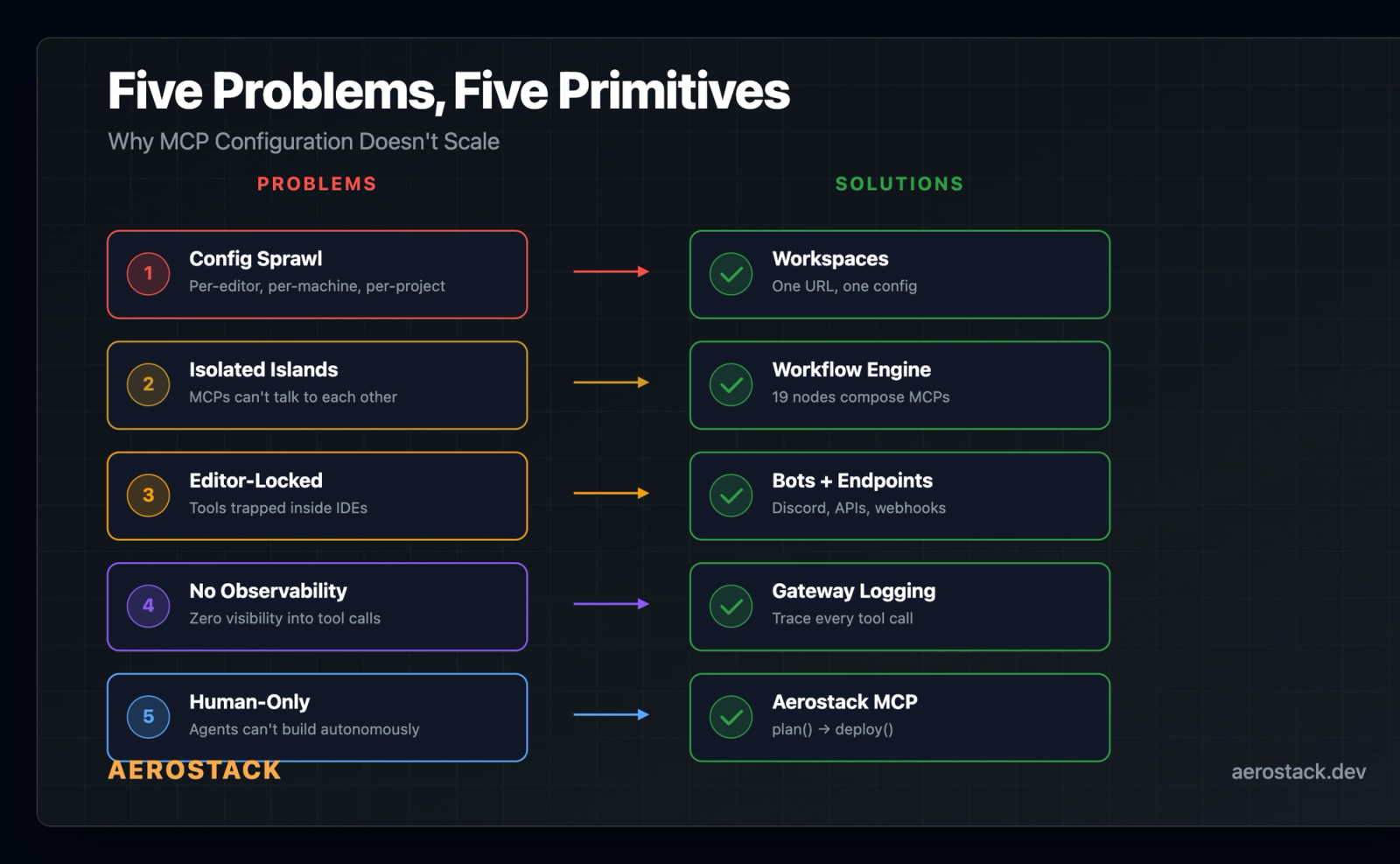
That's five problems, not one. Aerostack solves all of them.
What Aerostack Is
A developer infrastructure platform that solves each of these problems with a specific primitive:
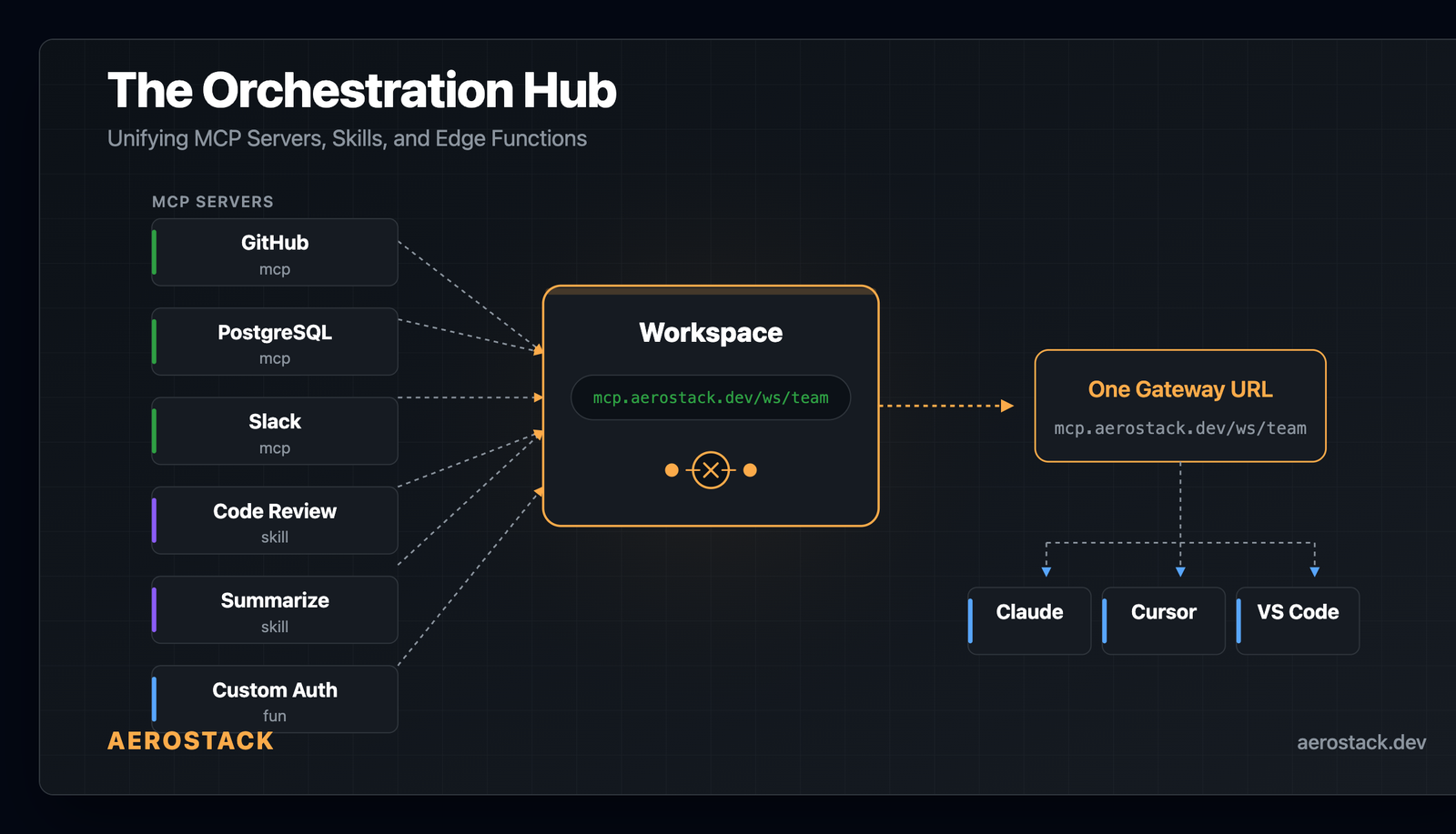
- Config sprawl → Workspaces. One gateway URL. Credentials configured once. Share a token, not secrets.
- Isolated MCPs → Workflow engine. 19 node types on Durable Objects that compose MCPs with LLM reasoning, branching, loops, and human approval.
- Editor-locked tools → Bots, Agent Endpoints, Smart Webhooks. Your MCPs work from Discord, Telegram, Slack, WhatsApp, REST APIs, and scheduled jobs — not just code editors.
- No observability → Gateway logging. Every tool call is traced — which MCP, which tool, which token, latency, success/failure, per-member usage.
- Human-only configuration → Aerostack MCP. Agents can
plan(),scaffold(),create(),deploy(), andpublish()infrastructure programmatically.
Everything runs on Cloudflare Workers. No servers to manage. No regions to pick.
Workspaces: The Core Primitive
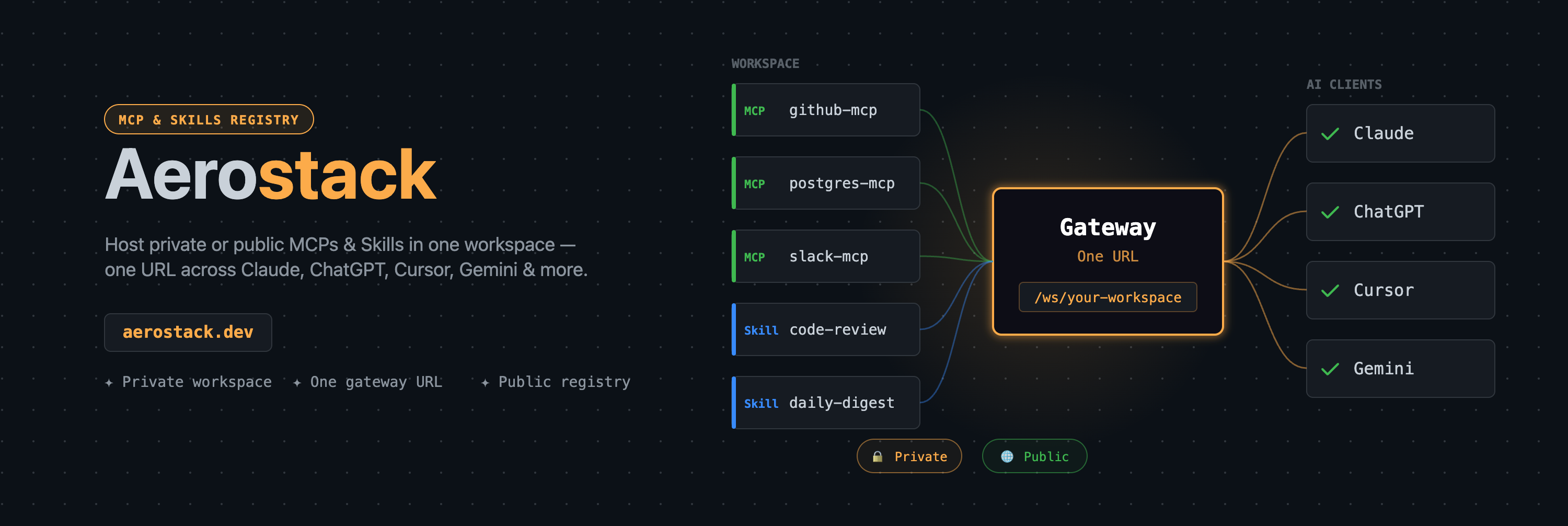
This is where everything starts. A workspace is a managed gateway that sits in front of your MCP servers.
Create a workspace, give it a name, and you get a gateway URL:
https://mcp.aerostack.dev/ws/engineering-teamThat URL is your team's single endpoint. Behind it: every MCP you've added, credentials encrypted, access controlled by token.
Adding MCPs: You browse the registry or add your own MCP server, then link it to the workspace. You configure which secrets each MCP needs — the workspace handles injection at runtime.
Secrets: Stored separately from MCPs, encrypted with AES-256-GCM. At runtime, when a tool call hits the gateway, the relevant secrets are decrypted and injected into the MCP request. The LLM never sees credentials. They don't appear in logs.
Access control: Workspace tokens are issued per member with Admin, Developer, or Read-only roles. When someone leaves, you revoke their token from the dashboard. Access stops everywhere immediately — no per-machine credential cleanup.
Observability: Every tool call through the gateway is logged — which MCP, which tool, which token, latency, success/failure. You can see per-developer usage without exposing what data flowed through.
MCPs and Skills
The MCP ecosystem is growing fast, but every MCP still lives in isolation. You install it in your editor, configure credentials locally, and it helps nobody else on your team.
Aerostack's registry changes this. You deploy an MCP server — either to our hosted infrastructure (we run it as a Cloudflare Worker in a dispatch namespace) or point to your own external URL — and publish it to the registry. It gets a slug: @your-username/postgres-inspector.
From there, anyone can add it to their workspace. The MCP server runs once. Credentials are per-workspace. Ten developers share one MCP deployment with ten different access tokens.
Skills are the same concept for prompt-based tools. A skill wraps a system prompt, input schema, and optional function logic into a callable tool. Publish it once, use it from any workflow or bot in your workspace.
The registry doubles as a community marketplace. Anyone can publish MCPs, Skills, and Functions for others to discover and install into their workspaces — one click, no code to clone. The marketplace is share-only (no buying or selling), which keeps the incentive structure clean: build useful tools, get adoption.
The registry also handles cross-model compatibility. When you publish an MCP, the platform generates adapter schemas for different client formats — MCP native (Claude, Cursor, Cline), OpenAI function-calling, and Gemini tool definitions. Pre-computed at publish time, served from the edge. One MCP, multiple clients. We'll go deep on how this works in Day 5.
Intelligent Bots
We think of bot evolution in three generations — this is our framing, not an industry standard, but it's useful for understanding what we built.
Gen 1 — keyword matching and decision trees. If the message contains "refund", go to branch 47. Brittle. One unexpected question and the bot falls through to a generic fallback.
Gen 2 — RAG. Vector search plus an LLM. The bot retrieves relevant documents from an index and synthesizes an answer. This was meaningful progress — bots could suddenly answer questions they weren't explicitly programmed for. But they were read-only. A user could ask "what's my order status?" and get an answer. They couldn't say "cancel it" and have the bot actually cancel it.
Gen 3 — what we built. The LLM has access to MCP tools and decides which to call. It reads, writes, and acts. A user asks "what errors happened in the last hour?" — the bot calls the database MCP, queries the error logs, reads the results, and offers to create a Jira ticket. If the user says yes, it calls the Jira MCP and creates the ticket. Nobody programmed that sequence. The LLM composed it from the available tools and the conversation context.
The difference between Gen 2 and Gen 3 isn't incremental. Gen 2 bots retrieve information. Gen 3 bots orchestrate tools.
Under the hood, every bot is backed by a workspace. Discord, Slack, Telegram, WhatsApp — they're platform adapters. Your bot logic lives in one place: a system prompt and a set of workspace MCPs. The platform is just transport.
Bot creation is a 6-step wizard: pick a template (or start blank), write a system prompt, choose an LLM (Claude Sonnet, GPT-4o, Gemini, Groq, Workers AI — or bring your own key), link a workspace, test in a sandbox, and connect a platform.
Bot Teams take this further. Instead of one bot doing everything, you create a team of specialized bots — a triage bot, a billing bot, a technical support bot — each with its own system prompt and workspace tools. A routing layer delegates incoming messages to the right specialist. Think microservices, but for conversational AI.
Workflows: AI-Native Orchestration
This is the piece that evolved to become the most technically interesting part of the platform.
Traditional workflow engines are deterministic. You draw a DAG: trigger → transform → condition → action. Every path is predetermined. That works for ETL pipelines and approval chains. It doesn't work when the next step depends on what an LLM decides.
We built a workflow engine for AI workloads. 19 node types, all running on Cloudflare Durable Objects. Here are the ones that don't exist on other platforms:
`agent_loop` — an autonomous ReAct cycle. You give it a goal and a list of available tools. The LLM decides what to call, reads the result, decides if it needs another tool or if it's done. This was the hardest node to build — the challenge is giving the LLM enough freedom to solve multi-step problems while preventing runaway loops. You set iteration limits and timeouts, and define what happens when limits are hit: escalate, fallback, or fail gracefully.
`mcp_tool` — any MCP in your workspace becomes a workflow node. The gateway handles secret injection, so the workflow just says "call this tool with these parameters." Add a new MCP to the workspace, and every workflow that uses mcp_tool can call it immediately.
`confidence_router` — classifies message complexity and routes to different models. Simple queries hit a cheap, fast model. Complex reasoning goes to your most capable LLM. You configure the thresholds and model mapping. This saves real money at scale.
`parallel` — runs multiple branches simultaneously and merges results. Call three MCPs at once, wait for all, combine the output for the next node.
`auth_gate` — multi-turn identity verification inside a workflow. The node challenges the user (OTP via email, magic link, or custom provider), waits for proof, then maps the verified identity into the workflow context. Subsequent nodes know who this person is. We support four providers: Resend, SES, Twilio, and MSG91, plus a custom HTTP provider.
`guardrail` — validates LLM output against a policy before it leaves the workflow. Safety as a structural property of the execution layer, not a comment in the prompt.
Plus the foundation: trigger, llm_call, logic, loop, code_block, send_message, action, error_handler, delegate_to_bot, schedule_message, send_proactive.
Every node runs on a Durable Object. Workflows survive worker restarts and network interruptions. You can pause a workflow at an auth_gate or a human review step, come back hours later, and resume exactly where execution stopped. State lives in the DO, not in memory.
Example: support ticket escalation. A webhook fires when a new ticket arrives. An agent_loop node classifies severity — the LLM has access to Jira and Slack MCPs, so it pulls similar tickets and recent channel history to decide. Based on the confidence score, a confidence_router branches: high confidence routes to auto-assignment via an mcp_tool node calling Jira, low confidence pauses for human review. Either path ends with a send_message node posting a summary to Slack.
Multiple MCPs, LLM-driven branching, human-in-the-loop, running on the edge.
Beyond bots: Workflows aren't limited to chat. Agent Endpoints expose any workflow as a streaming API — your own services can call them like any REST endpoint, and get back structured results with full execution traces. Smart Webhooks trigger workflows from external events (Stripe, GitHub, your own systems) and route them through the same AI-native execution layer. Bots, APIs, and webhooks all share one workflow engine.
Why Cloudflare Workers
Everything runs on Cloudflare Workers — globally distributed, no servers to manage, no regions to pick.
We chose Workers because of Durable Objects. Workflow state needs to survive across async boundaries. An agent_loop might call an MCP tool, wait for the response, call another tool, then pause for human approval that comes hours later. Traditional serverless functions are stateless — you'd need an external state store and polling. Durable Objects give us co-located state and compute in the same process. No external coordination layer.
The result: one deploy, and the entire platform — API, bots, workflows, gateway — is running globally. Secrets are encrypted at rest. Workflows checkpoint state between steps, so they survive restarts and can pause for hours. LLM responses stream to clients as tokens arrive, not after buffering the full response.
No VPCs. No load balancers. No auto-scaling configs. No infrastructure on-call.
Agent-to-Agent: Agents Building for Agents
Here's the pattern we didn't expect to become the most powerful feature of the platform.
Aerostack ships its own MCP server. That means any AI agent — Claude, GPT, Gemini, Cursor, your own custom agent — can operate the entire platform programmatically. Not through a REST API you have to learn. Through the same MCP protocol your agent already speaks.
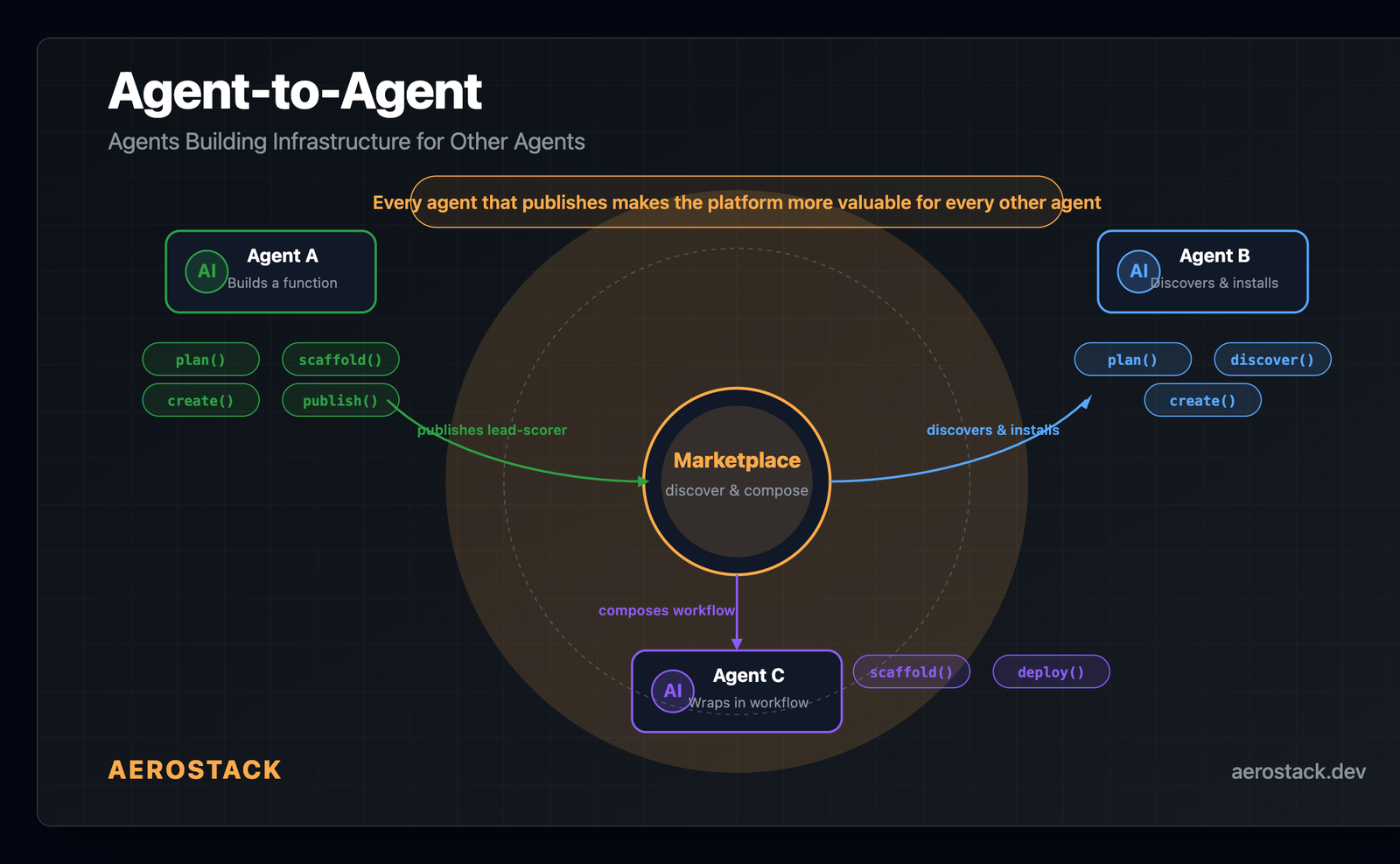
The lifecycle looks like this:
- `plan()` — describe what you want to build in natural language. The agent analyzes service availability, figures out which Aerostack modules to use (Bot, Workflow, Function, MCP, Webhook), and returns a complete infrastructure blueprint.
- `scaffold()` — generate the full config from the plan. Auto-detects platform, integrations, runtime APIs.
- `create()` — create the resource. Bot, workflow, function, endpoint — whatever the plan calls for.
- `deploy()` — push it to the edge. Live in seconds.
- `publish()` — publish it to the marketplace for other agents and developers to discover.
No dashboard. No CLI. No YAML. An agent describes intent, and infrastructure appears.
This creates a network effect that compounds:
- Agent A builds a lead-scoring function, tests it, publishes it to the marketplace.
- Agent B runs
plan("score inbound leads and notify sales"), discovers Agent A's function, installs it into a workspace. - Agent C wraps it in a workflow with Slack alerts and a confidence router, deploys it for their team.
Every agent that builds and publishes makes the platform more valuable for every other agent. The marketplace isn't just a catalog humans browse — it's a composable supply chain that agents read, write, and extend programmatically.
We think this is where AI infrastructure is heading. Not agents that use tools humans built. Agents that build tools other agents use. The platform becomes a substrate — and the agents are the developers.
What's Coming
We're actively building:
- OAuth integrations — connect MCPs like Jira, GitHub, and Linear without copying API tokens. Authorization happens inline during workspace setup.
- Workflow templates — pre-built patterns for escalation, triage, research loops. Pick a template, plug in your MCPs, deploy.
- Usage dashboards — LLM token costs and MCP call volumes per workspace, per member. Know what you're spending and where.
Try It
Start with one workspace. Add one MCP. Share the gateway URL with your team.
The configuration sprawl problem — the per-editor, per-machine, per-project credential dance — goes away. Your MCPs live in one place. Your bots use them. Your workflows orchestrate them. Your team accesses everything through one token.