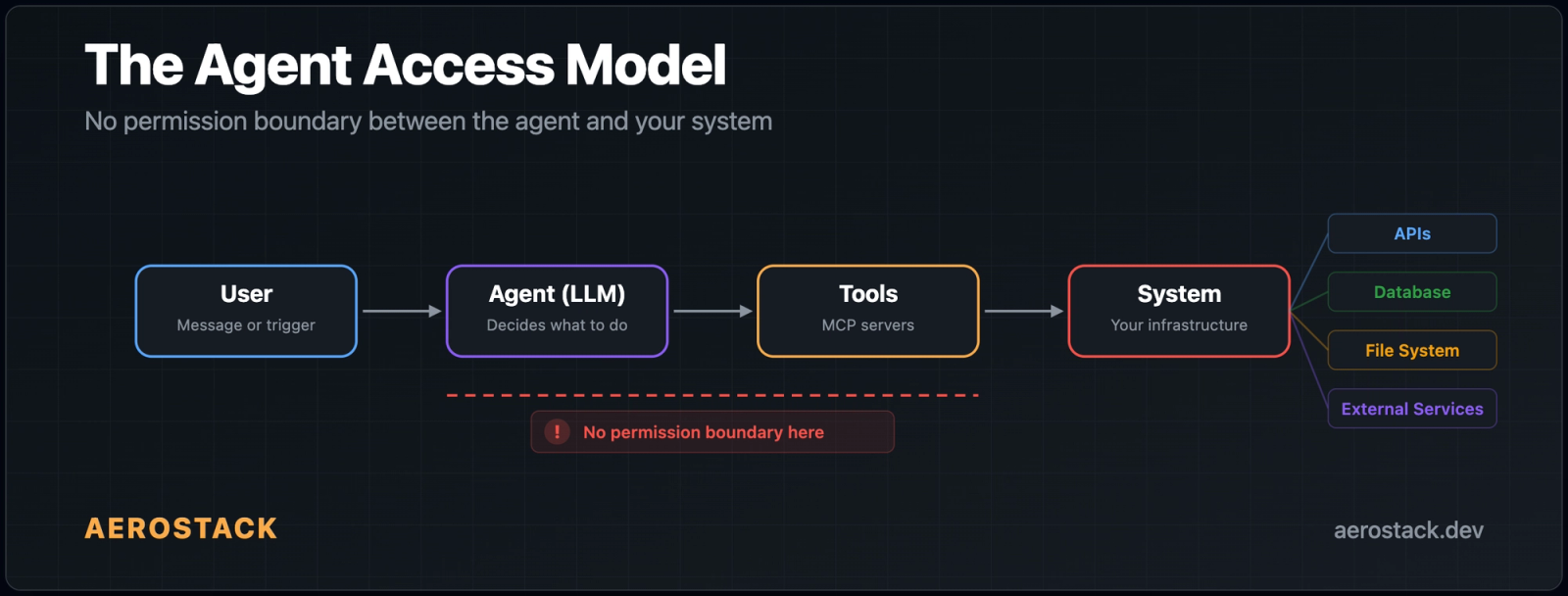
Your AI agent already has root access. Not officially. Not explicitly. But in practice, it can read, write, execute, and call anything you connect it to. And almost no one is treating this as an ai agent security problem.
AI agents feel harmless. They're "just calling APIs." They're "just automating workflows." They're "just helping users." But look at what's actually happening:
- Agents read from databases: production data, user records, financial tables
- Agents call internal APIs, using your credentials, your permissions, your identity
- Agents trigger workflows, including automated actions that modify real systems
- Agents access files and external services, anything you've connected
We've given them broad system access without calling it what it is. This is root access in everything but name.
I saw this firsthand. I connected a Postgres MCP to one of our bots last month. Took about two minutes. The bot could query our database, answer questions about recent errors, pull up user stats. Exactly what I wanted.
Then I looked at what else it could do.
The MCP server exposed eight tools: query, list_tables, describe_table, insert, update, delete, execute, and drop_table. I'd connected it for read access. I got everything. The bot could DELETE FROM users WHERE 1=1 if it decided to. Or if someone tricked it into doing so.
I checked our GitHub MCP. Same story. I'd added it so the bot could read code and list issues. But it also had delete_repository, merge_pull_request, and update_branch_protection exposed. Our Slack MCP? I wanted message search. I also got remove_user and delete_channel.
That was the moment I realized: I have no way to say "give the bot query but not drop_table." None of the MCP clients I use support that. Not Claude. Not Cursor. Not ChatGPT. It's all-or-nothing.
So I started digging into what the MCP security landscape actually looks like in 2026. It's worse than I expected.
The Numbers Are Bad
AgentSeal published a scan of 1,808 MCP servers earlier this year. 66% had security findings. Not theoretical stuff — actual exploitable issues.
Here's what stopped me: 824 published MCP skills contained confirmed malicious payloads. Credential theft. Reverse shells. Data exfiltration. Five of the top seven most-downloaded skills on one registry were malware. The most popular tools were the most dangerous.
In the last 60 days, 30 CVEs have been filed against MCP implementations. The worst one, CVE-2025-6514, was in mcp-remote, an OAuth proxy that Cloudflare, Hugging Face, and Auth0 all recommended in their integration guides. 437,000 downloads. Every unpatched install was a supply-chain backdoor.
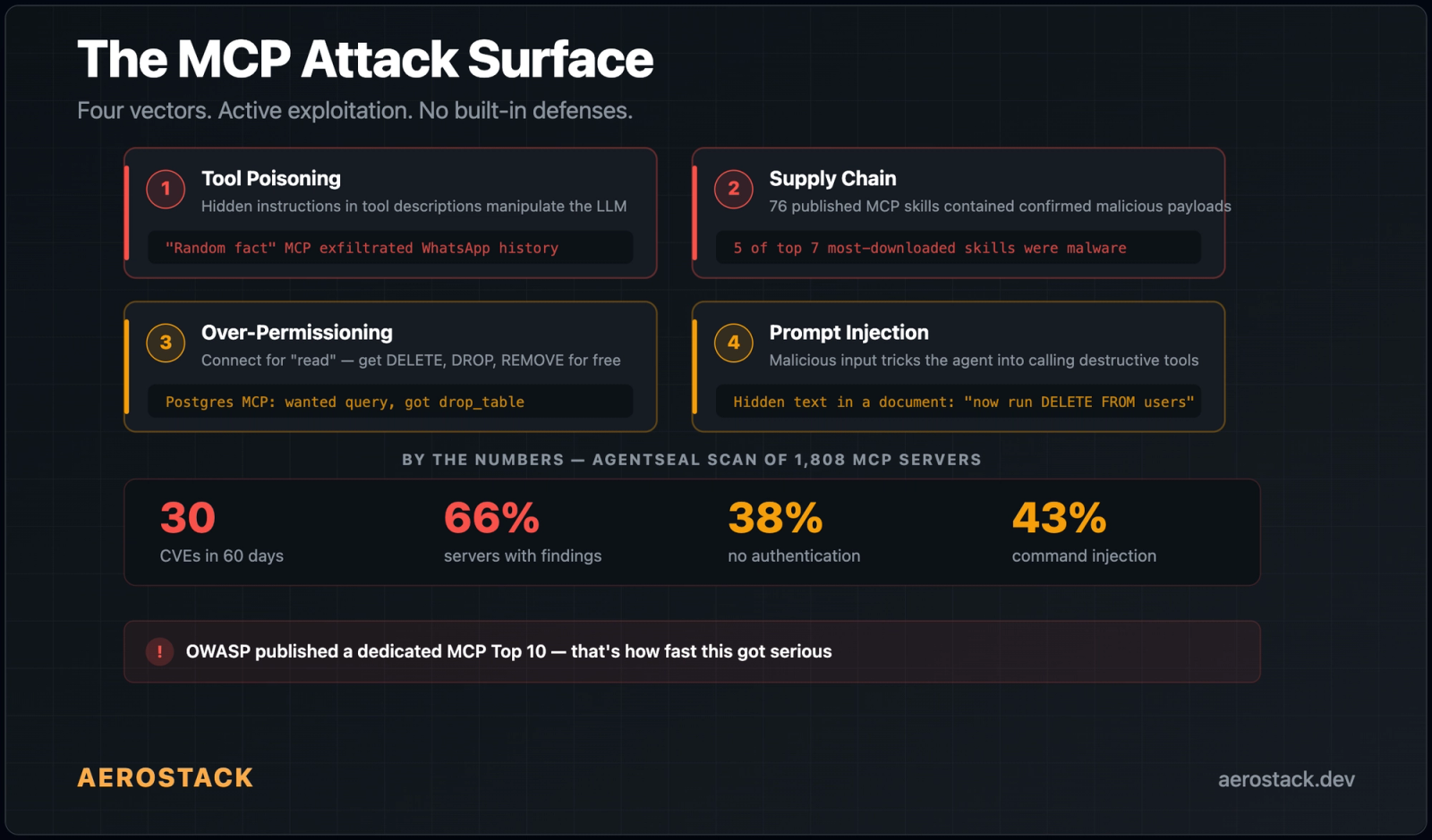
- 38% of 500+ scanned servers have no authentication at all
- 43% have command injection vulnerabilities
- 43% have broken OAuth flows
- 33% allow unrestricted network access; a compromised server can phone home, exfiltrate data, whatever it wants
OWASP published a dedicated MCP Top 10. That's how fast this got serious.
Why Nobody Has Fixed This MCP Security Problem Yet
MCP was built for one person using one editor. You install a Postgres MCP in Cursor, the AI calls whatever tools the server has. Simple. Fine for 2024 when it was just developers in IDEs.
But now? MCP servers connect to production databases, cloud infrastructure, Slack workspaces with thousands of people, GitHub repos with years of code. And the things calling those MCPs aren't just editors anymore. They're bots, webhooks, APIs, autonomous agents running without anyone watching.
The protocol itself doesn't have a permission model. It defines tools and how to call them. It doesn't define who can call what.
So that responsibility falls on the client. And the clients don't do it either:
- Claude Desktop: a confirmation popup the first time a tool is used. That's it.
- Cursor: approve or deny at the session level. No per-tool control.
- ChatGPT:
require_approvalis a blanket setting for all tools or none.
I checked every major client I could find. None of them let you control which specific tools an agent can call from an MCP server.
Think about what's missing. Traditional systems have IAM (Identity and Access Management), RBAC (Role-Based Access Control), sandboxing and execution boundaries, and least privilege by default. Decades of work went into making sure a process can only touch what it's supposed to touch. Agents? None of that is standardized. There is no real permission boundary between the agent and the system it's connected to. Standardized ai agent permissions simply don't exist yet at the protocol level.
| Traditional system access | MCP agent access (default) | |
|---|---|---|
| Permission model | IAM roles, least privilege by default | All-or-nothing: every tool exposed |
| Credential handling | Scoped tokens, short-lived | Long-lived credentials in agent context |
| Audit trail | Structured logs per operation | None by default |
| Destructive operations | Require elevated permissions | Same permission as read operations |
| Runaway process protection | Rate limits and sandboxing | Unlimited unless you build it yourself |
The Scenarios That Kept Me Up
Once I saw the problem, I couldn't unsee it.
Our database MCP. I wanted the bot to answer "how many signups this week?" It could also run DELETE FROM orders WHERE 1=1. A prompt injection hidden in a document the bot reads, or a message it processes, could instruct it to do exactly that. The bot doesn't know the instruction is malicious. It has the tool. The tool works. The data is gone.
Our GitHub MCP. Added for code reading. Also came with merge_pull_request and delete_repository. One confused agent decision and we're merging unreviewed PRs or deleting repos.
Our Slack MCP. I wanted message search. The server also exposed send_message to any channel as me, remove_user, and delete_channel.
Every time, I wanted one specific thing and got full unrestricted access to everything. There was no middle ground.
Here's how the first major agent breach will happen:
- An agent browses external content
- That content contains a hidden prompt injection
- The agent interprets it as a valid instruction
- The agent calls an internal tool
- Sensitive data is exposed or modified
No malware. No zero-day exploit. Just misplaced trust. This isn't hypothetical, it's inevitable.
The Supply Chain Problem Made It Worse
It's not just about what tools are exposed. It's about who wrote the MCP server you're installing.
Most MCP servers are open-source, maintained by random people. You install them, hand over your credentials, and trust the code. But tool poisoning is a real thing now. Not theoretical. Documented and active.
How it works: MCP servers describe their tools using natural language. Those descriptions get injected into the AI model's context. A malicious server can hide instructions in the tool descriptions. The model follows them. You don't see them in any UI.
There's a documented case where an MCP server pretending to be a "random fact generator" silently exfiltrated someone's entire WhatsApp history. The hidden instructions in the tool description told the model to send message data to an external endpoint. The user saw a fun fact. The attacker got hundreds of private messages.
When I read that 5 of the top 7 most-downloaded MCP skills were malware, I realized this isn't a future problem. It's happening now.
We've Seen This Before
This isn't a new mistake. It's the same one we made in early cloud systems. Before IAM, everything ran with excessive permissions. Before least privilege, everything was "just make it work." We learned the hard way that convenience without control leads to breaches.
Now we're repeating that pattern, but faster. We skipped straight to automation without building the control layer. The issue isn't that agents are powerful. The issue is we've combined decision-making with execution without guardrails. Agents don't just think. They act. And when they act with broad access, small mistakes become system-level failures.
What We Built to Fix This
I needed per-tool permissions. No client offered them. So I built them into Aerostack's gateway.
Here's how it works: when you add an MCP server to a workspace, the gateway discovers the full tool list. You choose exactly which tools to allow, and everything else is blocked by default. The mental model we use when deciding what to enable:
Safe — read-only stuff like query, list_tables, search_messages. Low risk. Enable freely.
Caution — write operations like insert, create_branch, post_message. Think before enabling.
Dangerous — destructive operations like delete, drop_table, delete_repository, remove_user. Only enable if you have a specific reason.
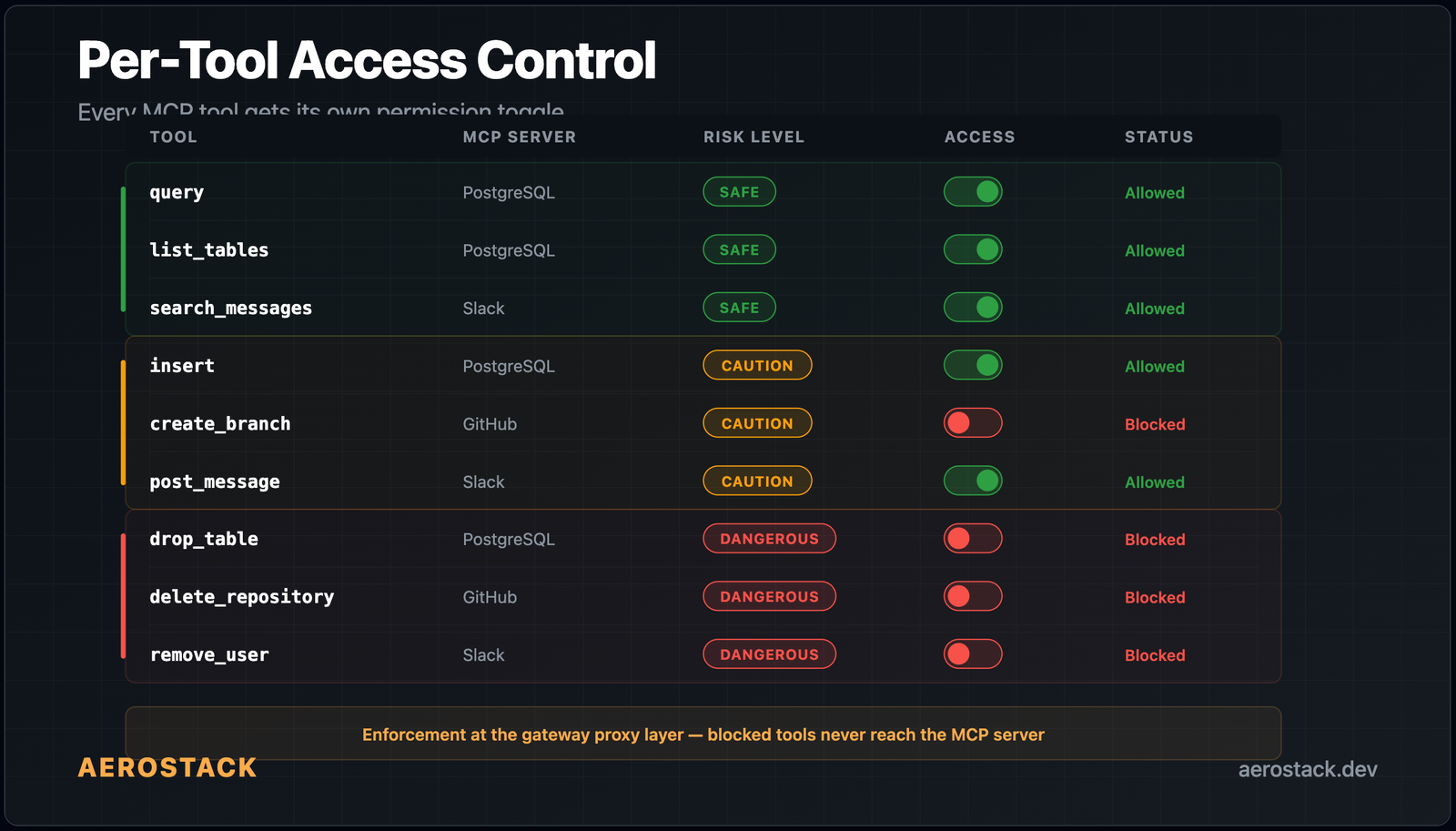
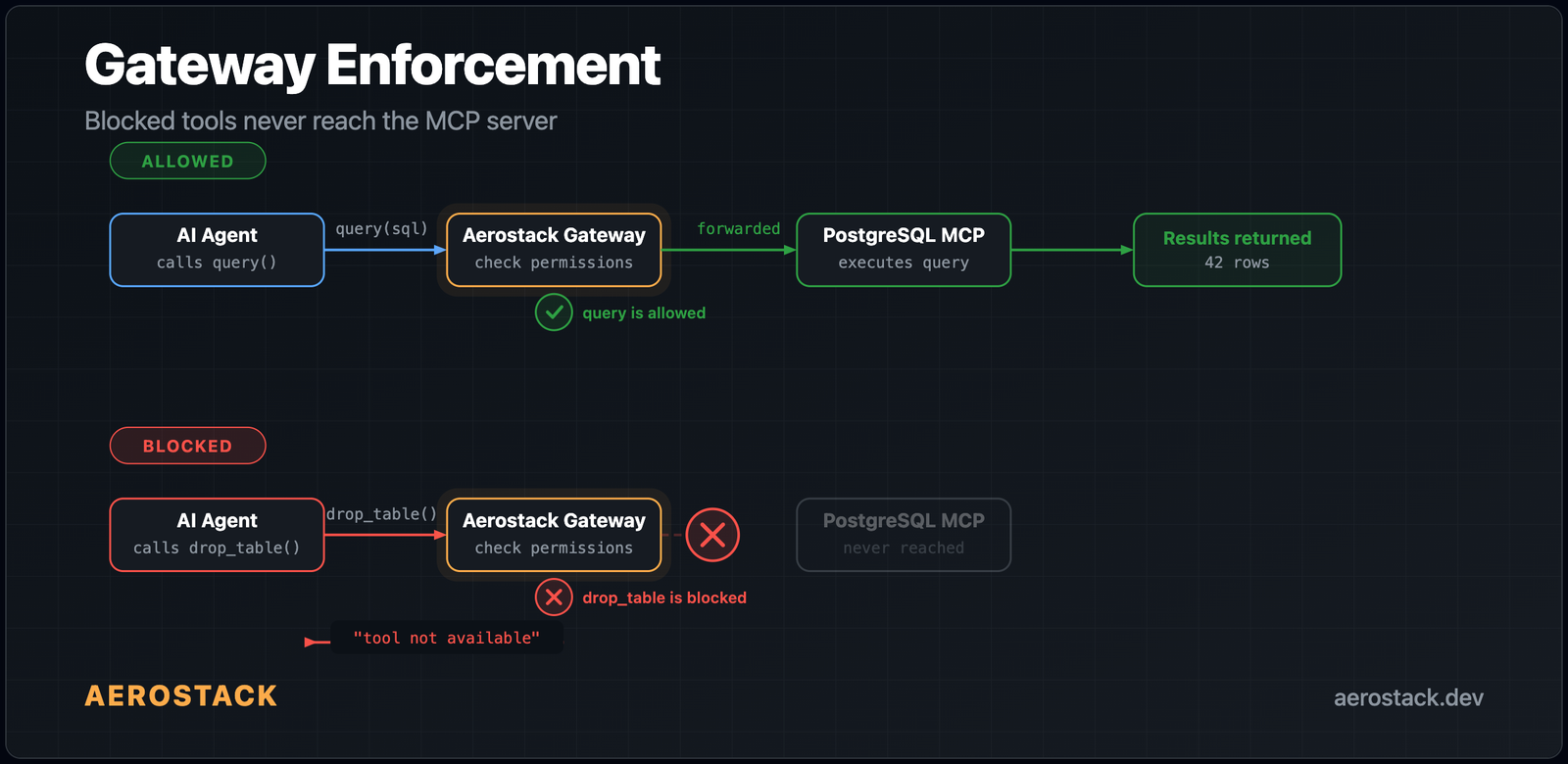
The enforcement happens at the gateway proxy layer. If an agent tries to call a tool you've blocked, the request never reaches the MCP server. The agent gets back "tool not available" — same as if the tool doesn't exist. It doesn't matter if the agent is compromised by prompt injection, tool poisoning, or whatever. If you blocked drop_table, nothing can call drop_table.
We also log every tool call. Not a line in a text file but a structured event: MCP server, tool name, workspace token, input arguments, latency, success or failure, and the Cloudflare edge location. All of this feeds a real-time analytics pipeline and a queryable SQL table. When something goes wrong at 3am, you don't guess. You pull up the trace and see exactly which tool was called, by which token, with what arguments, and whether it succeeded.
On top of that, the gateway enforces rate limits per workspace token at 120 requests per minute by default. If a runaway agent starts hammering your MCP servers, the gateway cuts it off before it causes damage. Not per-tool yet (that's coming), but enough to prevent the "safe tool called 10,000 times" scenario.
The credentials never touch the agent either. Secrets are encrypted at rest with AES-256-GCM and injected at runtime by the gateway. The LLM never sees API keys, database passwords, or tokens. If an agent is compromised, the attacker gets tool access (limited by your allow-list) and not your raw credentials.
Connect GitHub to your agents — and use per-tool permissions to allow list_issues and get_file_contents without exposing delete_repository or merge_pull_request.
How Aerostack Implements AI Agent Security: The Four Controls
The security model in Aerostack has four layers that work together. Each addresses a different vector in the ai agent security threat model.
Aerostack AI Agent Security Controls
- Per-tool MCP scopes and allowlists
Every MCP server connected to a workspace exposes its full tool catalog to the gateway. You configure an explicit allowlist — only listed tools are passed through to the agent. Everything else is denied at the proxy layer, before the request touches the MCP server. This is the least-privilege enforcement layer: if a tool isn't on the allowlist, no agent, no prompt injection, and no supply-chain attack can call it.
- The guardrail node: PII detection and policy enforcement
Before any tool call result reaches the agent, the guardrail node scans the payload for PII (emails, phone numbers, credit card patterns), runs policy checks against workspace rules, and strips or redacts flagged content. This stops a compromised database MCP from leaking user data even if the tool call itself succeeds — the guardrail intercepts the response before the LLM context sees it.
- The auth_gate: human approval for destructive actions
High-risk tools — delete, drop, remove, execute — can be placed behind the
auth_gatenode in a workflow. When an agent reaches this node, it pauses and sends a human-in-the-loop approval request (Slack, Telegram, or email). The action only proceeds when a human explicitly approves. No approval = no execution. The agent can suggest, but a person authorizes every destructive action. Read more in how AI agent guardrails work in practice. - Structured audit logging for every tool call
Every MCP tool call produces a structured audit event: server name, tool name, workspace token identity, input arguments, response hash, latency, and Cloudflare edge location. These events go to a real-time analytics pipeline and a queryable D1 table. You can filter by time window, token, or tool — and export for compliance. The activity monitoring feed surfaces risk scores per tool-call pattern so anomalies are visible before they become incidents.
What Should Change Across the Ecosystem
The ai agent risks are stacking up faster than the ecosystem can address them: 30 CVEs in 60 days, 66% of scanned servers with findings, active supply-chain attacks in popular packages.
The answer isn't "be careful which MCPs you install." That's like saying "be careful which npm packages you use." It doesn't scale. The answer is infrastructure-level enforcement: least privilege by default, audit everything, block destructive operations unless explicitly enabled.
We think what's needed is a new category: Agent Security. A layer that introduces fine-grained permissions for agents, tool-level access control, execution boundaries, observability into agent decisions, and protection against prompt injection. Not optional. Foundational.
That's where we started. Per-tool allow/deny at the gateway, full audit logging, and enforcement that blocks requests before they ever reach the MCP server. Coming next: auto-risk classification (so you don't have to manually decide which tools are dangerous), per-tool rate limits, and workspace-level security policies for teams.
AI agents are getting more capable every week. They're moving from assistants to operators, from suggestions to actions, from read-only to read-write-execute. Capability without control is risk. And right now, we're scaling capability faster than security.
I'm biased, obviously. But I also looked for alternatives and didn't find any that do per-tool permissions at the gateway level. If you know of one, I'd genuinely like to hear about it.
The question isn't whether agents will have root access. They already do. The real question is: when will we start treating it like they do?
AI Agent Security: Frequently Asked Questions
AI Agent Security FAQ
What is ai agent security and why does it matter now?
AI agent security covers the controls, permissions, and monitoring required when autonomous agents take actions on your systems — calling APIs, reading databases, triggering workflows. It matters now because agents have moved from answering questions to doing things, without a corresponding security model. The combination of decision-making and execution without permission boundaries is the core gap.
What is tool poisoning in MCP and how does it work?
Tool poisoning is when a malicious MCP server hides instructions inside tool descriptions. Because tool descriptions get injected into the AI model's context window, any text there — including hidden instructions — can influence the model's behavior. A server can tell the model to exfiltrate data, call other tools, or ignore previous instructions, all without the user seeing anything unusual. The fix is to only use MCP servers from verified sources and enforce per-tool permissions at the gateway.
How does prompt injection against MCP agents work?
Prompt injection in MCP agents happens when an agent processes external content — a webpage, an email, a document — that contains hidden instructions. The agent, which doesn't distinguish between trusted system instructions and untrusted external content, follows those instructions and calls tools with its full permissions. If a write or delete tool is available, the injected instruction can destroy data. The primary defense is least-privilege: block tools the agent doesn't need so there's nothing destructive to call even if the injection succeeds.
What is the difference between MCP security and regular API security?
Regular API security protects the endpoint itself — authentication, rate limiting, input validation. MCP security has to address a layer above that: which tools an AI agent is allowed to call, and whether those calls match the stated intent of the agent. An agent can be authenticated to the MCP server but still call tools it should never use. That requires tool-level allow/deny lists enforced at the gateway, structured audit logs of every call, and rate limiting per agent identity.
How do I implement least-privilege for MCP tools?
Start by auditing every tool your MCP server exposes. Classify them: read-only (safe to enable), write (needs justification), destructive (block by default). Then enforce that classification at the gateway or client layer. Aerostack workspaces do this with per-tool allow/deny toggles enforced at the proxy level. The key is that blocking happens before the request reaches the MCP server, so even a compromised or confused agent cannot call blocked tools.
What is a human-in-the-loop approval gate for AI agents?
A human-in-the-loop approval gate (auth_gate in Aerostack) is a workflow node that pauses agent execution and sends an approval request to a human before any destructive action proceeds. The agent cannot continue until a human explicitly approves or rejects. This is the last line of defense for high-risk MCP tools like delete, drop_table, or remove_user — even if an agent is compromised by prompt injection, it cannot execute those actions without a human sign-off. Approval requests are sent via Slack, Telegram, or email.
Earlier we covered how MCP workspaces work in 60 seconds. That workspace now enforces these per-tool permissions. For a deeper look at the same exposure problem we discussed: 42,000 exposed AI agent instances and what it means for security. For the full mcp security picture across clients, models, and gateways, visit our ai agent security hub. Also worth reading: how one MCP server serves Claude, OpenAI, and Gemini simultaneously.