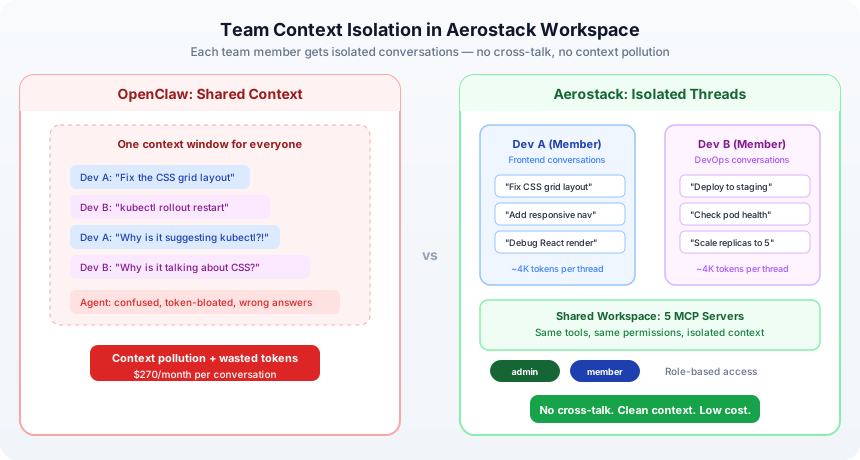
I tried to let my co-worker use the agent last week. Within an hour, his DevOps conversation had polluted my coding context. I asked the agent about a CSS layout issue and it suggested running kubectl rollout restart. That's when I realized OpenClaw has a real problem with multi-user scenarios — and it's not getting fixed anytime soon.
The Gap That Won't Go Away
GitHub issue #8081—"Multi-user permission management with role-based access control"—has been open since early 2026. 200+ upvotes. Still open. The Discord channel is full of people asking the same question: how do you run OpenClaw with a team?
From the OpenClaw Discord: "OpenClaw is not tuned for the multi-user use case." That's a direct quote from the maintainers. Not a bug, not a roadmap item—a design constraint.
The reasons are real:
Context collisions. Every conversation goes into the same memory buffer. You ask about CSS, but the agent's context includes your co-worker's entire deployment history. Token bloat, wrong suggestions, lost focus.
No permission boundaries. There's no built-in way to say "this person can use tools, but can't delete the knowledge base" or "they can view logs but not modify configs." Everyone gets all access or no access.
Single-threaded pinch points. OpenClaw's architecture has synchronous approval gates and conversation routing that don't scale well beyond a handful of simultaneous users.
What People Are Actually Doing
The community has solved this the hard way. I've seen three main patterns:
Separate instances per person is the most common. You spin up a new OpenClaw container for each team member. Works fine at small scale—your contexts are isolated, permissions are moot because everyone's their own admin. But now you're managing N instances, N separate credential sets, N config files. If you have a knowledge base, you're replicating it across all of them. Maintenance nightmare.
Kubernetes multi-agent deployments is what some teams do if they have the infrastructure. There's a Medium post by Humble walking through how to deploy OpenClaw across multiple pods with service discovery and load balancing. It's solid engineering, but it's a lot of infrastructure for what should be a simple collaboration feature.
Custom gateways per team is what the OpenClaw security docs themselves recommend. You create a separate gateway for each team or trust boundary. Again, it works, but it's a band-aid. The fact that the official documentation recommends this tells you something about how un-native multi-user feels.
What I Do Instead
Full disclosure: I built Aerostack. But I'm not mentioning it to sell you. I'm mentioning it because the multi-user problem is exactly what we designed around from day one.
In a Workspace (Aerostack's core unit), multiple people can use the same agents and tools. Here's what actually happens:
Each person gets their own conversation threads. When my co-worker asks about deployments, only his deployment conversations are in the context window. When I ask about CSS, only my frontend conversations are there. No cross-talk. Token cost stays low per conversation because context is actually isolated.
Everyone has a role. Admin has full control—can modify permissions, manage team members, adjust tool access. Member can use the tools and create conversations, but can't change permissions or server configs. You invite someone with a link. Takes under a minute. They inherit the workspace permissions automatically.
The Approval Piece
When an agent action triggers an approval gate, the workspace owner gets a push notification — on their phone, on their laptop, wherever they're logged in. They review the action, approve or reject, and the agent continues.
Right now, approvals route to the workspace owner. That's a bottleneck we're aware of, and multi-approver routing is on the roadmap. But even with single-owner approvals, the mobile app makes it fast — you can approve from your lock screen in under five seconds. It's not the same as being chained to a dashboard.
The Conversation Control Angle
There's another thing that's quieter but important. When you have conversation isolation, you can also set conversation-level permissions. Maybe there's a conversation about internal cost analysis. You lock it to Admins only. Meanwhile, the frontend team is working in a separate conversation about UI components. No one's accidentally seeing what they shouldn't.
The context never gets tangled. The memory never gets confused.
The Real Point
The fact that GitHub issue #8081 has 200+ upvotes tells you this is a genuine gap. Whether OpenClaw adds native multi-user support or the community builds it out, the problem needs solving. Companies aren't running agents solo. Teams need this.
In the meantime, the choices are work around it — spin up instances, run infrastructure, manage configs — or use something built for teams from the start.
Try team workspaces: aerostack.dev
Part of the Agent Operations series. Start with the full guide: "I Run 5 MCP Servers on OpenClaw"