Approving Agent Actions from Your Phone: The 5-Second Workflow
My agent tried to push to main while I was getting coffee. I approved it from the checkout line. That's either the future or deeply irresponsible. Probably both.
Full disclosure: I built this app. And I use it almost every day.
The Problem Nobody Wants to Admit
Your agent runs 24/7. You don't. So when it needs approval at 11 PM on a Tuesday, or while you're in a client meeting, or during a weekend when you're deliberately offline—what happens? The agent waits. It just... waits. Sometimes for an hour. Sometimes longer. Then the approval expires. The deployment stalls. The content posting waits. The git push that needed sign-off never happens.
We built approval gates into OpenClaw for good reason. You don't want your agent running rm -rf / without asking permission first. But the approval system was always anchored to a dashboard—something you needed to be at your desk to interact with.
That created a new problem: agents waiting, humans unreachable. Work queuing up. The approval window closing.
The Five-Second Workflow
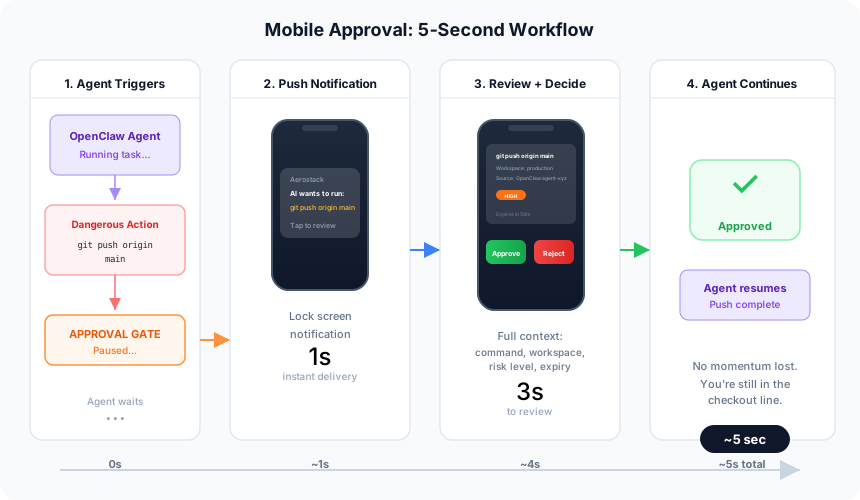
The mobile app (Flutter, iOS and Android) solves this by treating approvals like messages instead of dashboard tasks.
Push notification hits your lock screen. Something like this:
🔔 AI wants to run: git push origin main
(Aerostack)
You tap. The full action preview appears. The exact command. Which workspace it's running in. The risk level. How much time before it expires. You can read the whole thing in three seconds.
Then you swipe right to approve, or swipe left to reject. Under five seconds from notification to decision. No app opening, no navigation, no menus.
If you need more context—logs, the git diff it's about to commit, the workspace settings—you tap into details. But most of the time, you don't. You know your agent. You know whether git push origin main from the production deploy function should happen right now.
What's on the Home Feed
The app shows two sections. The top is pending approvals—each one is a card with an action icon, a summary of what it wants to do, the source (which agent, which workflow step), and the countdown timer. Swipe or tap.
Below that is today's activity. Approvals you've accepted (✓). Ones you rejected (✗). Actions that auto-allowed because the risk level was low (⚡). It gives you a sense of what your agents actually did while you weren't watching.
Batch Approvals, One Tap
If you're running content workflows where the agent generates eight social media posts and wants approval on all of them, you can select them all—tap, tap, tap, tap, tap, tap, tap, tap—and then approve the whole batch in one action. My content person loves this. She gets a notification that the agent has prepared eight posts. She opens the app, reviews them as a stack, and approves them all at once. They go live ten seconds later.
The Emergency Kill Switch
Here's a story that made me glad this feature exists.
11 PM on a Thursday. I'm scrolling through the activity feed on my phone before bed. I notice a burst of API calls — way more than normal for that hour. Nothing obviously malicious, but my pulse ticked up. Something felt wrong.
I opened the app. Workspace. Tokens. Swipe to revoke. Twenty seconds, start to finish. The agent lost access instantly.
Turned out to be a harmless retry loop. A function was catching a transient timeout and re-running automatically. Nothing sinister. But those twenty seconds mattered. Without the app, I would've had to find my laptop, open it, SSH into the server, figure out which token to kill. By then, if it had been a real compromise, the damage would've been done.
When This Actually Matters
After-hours agent runs. During meetings. Commuting. Weekends. Holidays. Any time you're not at your desk but the agent still needs an answer.
The agent doesn't know you're in a meeting. It doesn't know you're hiking. It still has work to do. Sometimes that work needs approval. Before the mobile app, you either had to ask the agent to wait, or you had to step away, find a laptop, and approve it there. Now you just swipe.
The Counterargument (I Get It)
I know what you're thinking. "Approving production deployments from my phone sounds like a disaster waiting to happen." And you're not wrong. I'd feel the same way if the only alternative was a sloppy mobile UX where you accidentally approve something in the dark because the buttons are too small.
The alternative isn't a polished desktop experience though. The alternative is an agent waiting indefinitely, or an approval window timing out, or you granting the agent permission to self-approve in situations where it shouldn't have that power. Those are worse.
The five-second workflow is built on the assumption that you know your agent. You've set up the rules. You trust it in most scenarios. The approval gate is there for the edge cases—when something feels off, or when the risk level is high, or when you just want to double-check. On your phone, under five seconds, you can make that call.
The Bottom Line
Your agents run 24/7. You don't. The mobile app bridges that gap — five seconds, from anywhere, with full context.
Download the Aerostack app or get started at aerostack.dev
Part of the Agent Operations series. Start with the full guide: "I Run 5 MCP Servers on OpenClaw"