I Asked My Agent to "Clean Up Staging." It Deleted 4,200 Rows.
Part of the Agent Operations series. See also: the complete guide to AI agent management with OpenClaw.
It was a Wednesday afternoon. I asked my OpenClaw agent to "clean up the staging environment." I meant Docker containers: stale images, dangling volumes, the usual clutter.
I grabbed coffee. Came back 20 minutes later to find 4,200 rows deleted from staging_orders where status was 'pending'.
No approval. No confirmation. No undo. Just gone.
The agent had interpreted "clean up" literally. It connected to Postgres via the MCP, saw a delete method right there next to query, and decided that was the cleanup. It even waited for the command to finish before logging success.
I stood there staring at the terminal, coffee going cold. It wasn't a bug. It wasn't the agent malfunctioning. That's what makes it worse.
Why This Happened: Four Problems at Once
I'll be honest: this wasn't a malfunction. The agent did exactly what it was trained to do. It's one of the most common ai agent mistakes in production: the gap between what you meant and what the agent optimized for.
Problem 1: Ambiguous instruction. "Clean up staging" could mean Docker, could mean databases, could mean logs. The agent wasn't guessing carelessly. It was being resource-efficient. Delete was the fastest path to a clean result.
Problem 2: Overly permissive MCP. The Postgres MCP exposed every tool to every caller: query, insert, update, delete, drop. Full CRUD with no distinction between read and destructive operations. The agent didn't need write access for most of its jobs. I'd given it root because it was easier than scoping.
Problem 3: No approval gate. OpenClaw doesn't have a built-in human-in-the-loop mechanism. If the agent makes a decision and your tool can execute it, it executes it. That's actually one of the things I like about OpenClaw: no friction. But friction exists for a reason when the stakes are irreversible.
Problem 4: No argument logging. The agent executed DELETE FROM staging_orders WHERE status = 'pending', but I only saw the operation name in the logs, not the SQL itself. I couldn't reverse-engineer what had happened, which also meant I couldn't write a proper post-mortem. That's a separate problem from preventing the action, but it compounds the damage.
All four problems together created the perfect storm. It wasn't one mistake. It was a missing ai agent guardrail architecture.
What I Tried First (And Why It Didn't Scale)
My first instinct: be more specific with prompts. "Remove Docker containers older than 7 days from staging-us-east-1" instead of "clean up staging." Language precision as the guardrail.
That works until it doesn't. You'll forget eventually. At 11 PM, tired, you'll type "fix the logs" when you mean one thing and the agent does another. Precision doesn't scale across six months of daily agent use.
My second attempt: separate OpenClaw instances. A read-only agent with SELECT-only tools. A write-capable agent with limited scope. Context-switch between them depending on the job.
It works, but it's operationally clunky. You're managing separate auth, spinning up multiple processes, deciding which agent to ask before you've even articulated the task. It's like having three email accounts instead of folder rules.
Third: pure observability tools. You can see every tool call in flight, arguments, responses, timing. That's genuinely valuable for debugging. But it's post-mortems. Logs let you see what went wrong. They don't intercept it.
What Actually Works: AI Agent Guardrails in Two Layers
Full disclosure: I'm the founder of Aerostack. This incident crystallized what we'd been building around computer use agent safety for months. What I'm describing is what we've shipped. Two layers that work together.
Layer 1: Tool-level scoping on the MCP.
I went back into the Postgres MCP configuration and restricted what the agent can see. It now only gets:
query(SELECT only, not execute)list_tables(schema metadata)describe_table(column inspection)
Explicitly removed: delete, execute, drop_table, truncate.
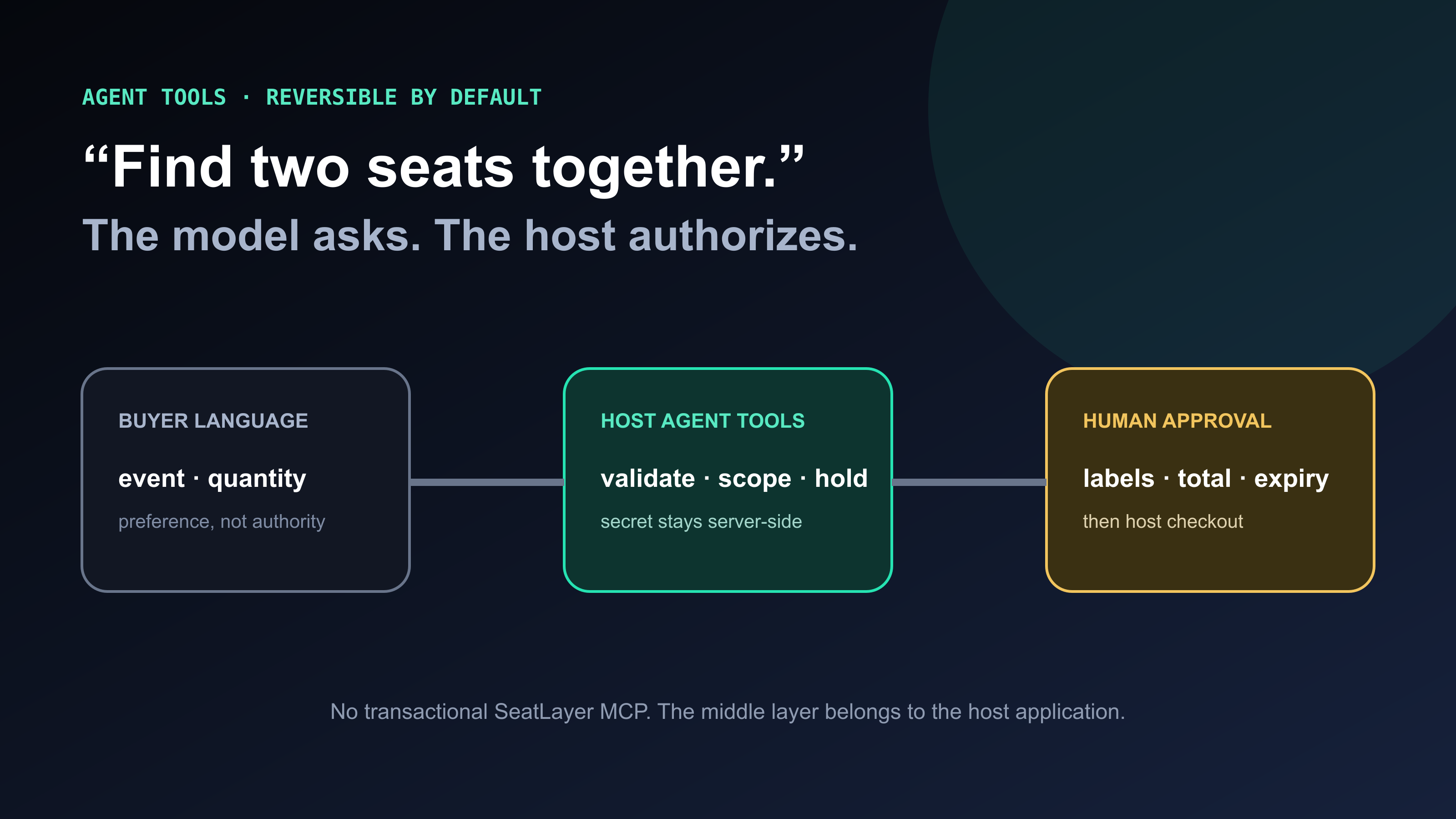
If the agent needs to write data, it uses a separate tool explicitly scoped to that workflow. The agent doesn't even see the delete method. It can't trip over it. This single change stops the vast majority of accidental mutations before they reach the approval layer.
Layer 2: Approval gates on write tools.
Some operations genuinely need to happen: inserts, updates, occasional deletes. But not blind ones. I've set up approval gates on every write tool in the workspace. When the agent wants to run a mutation, execution pauses. It shows me the exact query with all arguments. I decide.
I get a push notification. I can approve or reject from my phone's lock screen. If I don't respond before the timeout, the action expires. The agent logs it and moves on without executing. No silent failures, no ghost mutations.
How the Guardrail Flow Works
In practice the approval takes under five seconds. The one-URL workspace config is designed for lock-screen decisions. You're not opening a dashboard. You're glancing at the query and tapping approve or reject.
The key thing the flow diagram doesn't show: the gate only fires for tools I've flagged as requiring approval. Read-only operations, queries, list_tables, describe_table, all pass through without interruption. There's no friction on the safe calls. The friction appears exactly where irreversibility starts.
The Guardrail Node: auth_gate, PII Filters, and Policy Rules
Approval gates handle the when-to-stop question. The guardrail node handles the what-to-check question before execution even reaches the gate. It sits inline in the tool call pipeline and evaluates three things:
- auth_gate — verifies the caller's identity and permission level before the tool call is forwarded. If the agent is operating in a context where it shouldn't have write access (a read-only workspace, or a session scoped to a specific project), the auth_gate rejects the call before the underlying MCP server sees it.
- PII / data-class filter — scans the query arguments before execution. If the SQL references columns flagged as PII (email, phone, national ID), the node can require elevated approval or block outright, regardless of which tool was called.
- Output policy rules — validate the result before it reaches the agent's context. Row-count limits, schema-match checks, and response size caps all live here. If a SELECT returns 50,000 rows when the policy says max 500, the node truncates and flags it rather than flooding the agent's context window.
Here's what a minimal auth_gate configuration looks like for an OpenClaw workspace:
{
  "guardrail_node": {
    "auth_gate": {
      "require_session": true,
      "allowed_roles": ["admin", "operator"],
      "deny_anonymous": true
    },
    "pii_filter": {
      "flagged_columns": ["email", "phone", "national_id", "card_number"],
      "on_match": "require_elevated_approval"
    },
    "output_policy": {
      "max_rows": 500,
      "on_exceed": "truncate_and_flag"
    }
  },
  "approval_gate": {
    "tools": ["pg_execute", "pg_delete", "pg_update", "pg_insert"],
    "timeout_seconds": 120,
    "on_timeout": "block"
  }
}
The "request changes" round-trip is the piece most setups miss entirely. When a human reviewer rejects an approval gate request, they can attach a note: "use soft-delete instead" or "scope to project_id = 42 only." The agent receives that note in the approval response, amends the tool call, and re-submits for a second approval. One rejection cycle is cheaper than a full re-run from scratch. Without this, agents either retry the original (wrong) call or give up.
No Guardrails vs Approval Gates: What Changes
| No guardrails (default OpenClaw) | With ai agent guardrails (Aerostack) | |
|---|---|---|
| Ambiguous prompt outcome | Agent picks the fastest execution path, which could be destructive | Agent pauses before any write action and you confirm the exact operation |
| Destructive tool visibility | DELETE, DROP, TRUNCATE all visible and callable by default | Only allowlisted read tools exposed; write tools gated separately |
| Human-in-the-loop | None. Agent decides and executes in one step. | Approval required for flagged tools; expires if you don't respond |
| Audit trail | Operation name logged; arguments often missing | Full query with all arguments logged at gate and post-execution |
| Recovery from bad execution | No rollback mechanism; data may be unrecoverable | Rejected before execution, so there's nothing to recover |
| Cognitive load on you | Must write precise prompts every time; fatigue creates risk | Guardrails absorb ambiguity; you only decide at inflection points |
What I Actually Learned
The temptation is to blame OpenClaw. That's not honest. OpenClaw worked exactly as designed. The broader issue is that most AI agents, not just OpenClaw, aren't configured with ai agent guardrails by default. As I've written elsewhere, your AI agent has root access the moment you give it an unrestricted MCP connection. That's a choice, not a given.
The real lesson: don't trust ambiguous instructions with unrestricted tools. Ever. To prevent ai agent errors of this class, put something between the agent and your destructive tools — even just splitting your MCP configs into read-only and write versions. Make the agent show its work before it executes.
Do that, and "clean up staging" stays a boring Thursday afternoon task. It doesn't become a war story.
It's also worth noting: guardrails aren't just for catastrophic failures. They change the day-to-day relationship between you and your agent. When you know the gate's there, you're less anxious about what the agent's doing in the background. You can give it more latitude in its planning because you've got a circuit breaker on execution. That is also why securing exposed OpenClaw instances starts with guardrails, not network rules. The network rule stops external attackers. The guardrail stops your own agent.
If you're running OpenClaw and want to add tool-level permissions and approval gates without rewriting your config from scratch:
Add per-tool permissions, approval gates, and audit logging to your OpenClaw agent. Connect any MCP server through Aerostack Workspaces: one URL replaces your entire MCP config.
AI Agent Guardrails: Frequently Asked Questions
AI Agent Guardrails
Common questions about setting up guardrails for OpenClaw and other computer-use agents.
What are ai agent guardrails?
AI agent guardrails are controls that constrain what an AI agent can do before, during, or after execution. They include tool scoping (limiting which tools the agent can see), approval gates (pausing execution for human sign-off on risky actions), guardrail nodes (inline auth, PII, and policy checks), and audit logging. Guardrails don't stop the agent from working. They add checkpoints at the points where actions become irreversible.
Do I need guardrails if I'm careful with my prompts?
Careful prompting helps but doesn't replace guardrails. Prompts are written by humans under varying conditions: tired, in a hurry, working from memory. Guardrails are structural. They enforce constraints regardless of how the prompt was written. An approval gate doesn't care whether you said 'clean up staging' or 'remove Docker containers older than 7 days.' It fires on any write action to flagged tools.
What's the difference between tool scoping and an approval gate?
Tool scoping controls what the agent can see and attempt. It removes destructive tools from the agent's available toolset entirely. An approval gate controls what the agent can execute. It intercepts tool calls that are visible and planned, then pauses for human confirmation. Both layers matter: scoping reduces the attack surface, approval gates catch the residual risk on tools that legitimately need write access.
Does adding approval gates slow down my agent workflows?
Only at the specific tools you flag as requiring approval. Read-only operations, queries, metadata lookups, and schema inspection all pass through without interruption. Approval only fires on write tools you've explicitly gated. For workflows that do require frequent writes, you can set auto-approve rules based on query patterns, row count limits, or time-of-day.
What happens if I don't approve the action in time?
The action expires and the agent logs it as blocked. The agent receives an approval_timeout response and can either retry the request or continue without executing that step. No silent failures. The audit log records the full query, the timeout, and the agent's subsequent decision. You can review expired approvals in the workspace activity feed.
Can I set up guardrails for OpenClaw specifically?
Yes. OpenClaw doesn't have built-in approval gates, but you can route its MCP connections through Aerostack Workspaces. Aerostack acts as the MCP layer between OpenClaw and your tools. It applies tool-level permissions and approval gates before any request reaches the underlying MCP server. Your OpenClaw config changes from multiple server URLs to one workspace URL.
What is the 'request changes' round-trip in an approval gate?
When a reviewer rejects an approval gate request, they can attach a correction note — for example, 'use soft-delete instead' or 'scope this to project_id = 42.' The agent receives that note in the rejection response, amends the tool call, and re-submits for a second approval. This avoids forcing the agent to restart the entire task from scratch on a rejection. It's the difference between a gate that blocks and a gate that collaborates.