OpenClaw Credentials Are Stored in Plaintext. Here's Why That Matters.
Last month, Kaspersky reported that RedLine and Lumma—infostealers actively traded in underground forums—have added OpenClaw file paths to their target lists. That means malware authors are specifically looking for the same places where your API keys, JWT secrets, and OAuth tokens are sitting: plaintext config files and memory dumps on your local machine.
Not encrypted. Not hashed. Just there.
What's Actually Getting Exposed
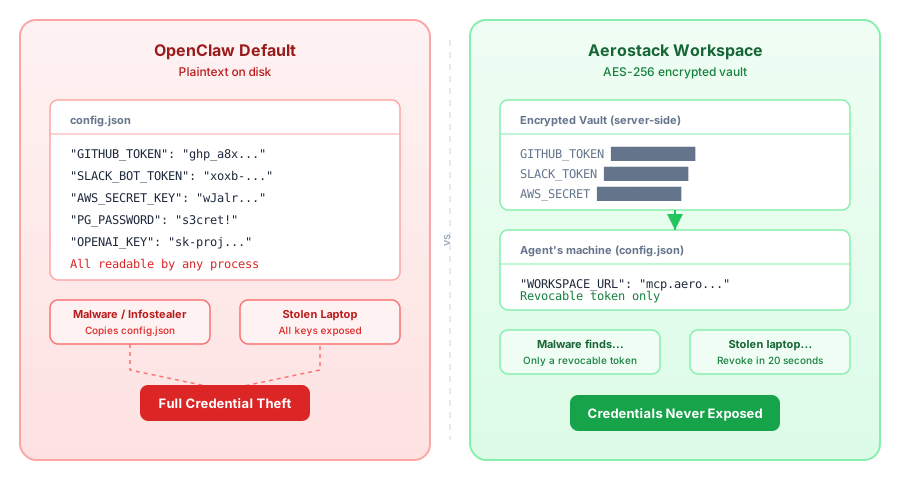
OpenClaw stores credentials in three places, and all of them are plaintext:
Config files (
config.json, agent credentials files) — written to disk when you set up your connectionsMemory files — OpenClaw's runtime state, logged to the filesystem for debugging and state recovery
Chat logs — every interaction with the agent, including API calls and credential exchanges
Gartner called this pattern what it is: "insecure by default, plaintext credential storage." It's not a bug. It's how the system works.
The Real Risk
Here's the cold part: if someone compromises your machine—malware, a stolen laptop, an authorized person with filesystem access—every credential your agent can see is immediately accessible. No brute force needed. No cryptography to crack. Copy, paste, use.
Your Stripe key, sitting in plaintext. Your OpenAI API key, sitting in plaintext. Your database password, sitting in plaintext. The agent can access them all, so the attacker gets them all.
And if you're running OpenClaw on a server (which people do, for persistent agents), the risk multiplies. More users on the system, more potential attack surface, same plaintext exposure.
What the Community Does (And Why It's Not Enough)
People have figured out workarounds. I've seen all of them:
Separate OS users — isolate OpenClaw's process under a dedicated user with restricted filesystem permissions. Helps if malware doesn't escalate privileges.
Encrypted disk partitions — put the entire OpenClaw directory on an encrypted volume. Useful until someone gains filesystem access while the system is running.
Kubernetes secrets — for server deployments, inject credentials as environment variables instead of files. Better, but the agent process can still read its own environment.
Environment variables instead of config files — same problem in a different container. The agent can still read
process.env.Rotating keys frequently — a good security habit regardless, but you're still storing plaintext in between rotations.
All of these reduce risk, but they're band-aids on the underlying problem: the agent can see the raw credentials, so if anything can see the agent's process memory, the credentials are exposed.
What We Did Instead
Full disclosure: I built Aerostack. We didn't want our users to run into this problem, so we inverted the whole flow.
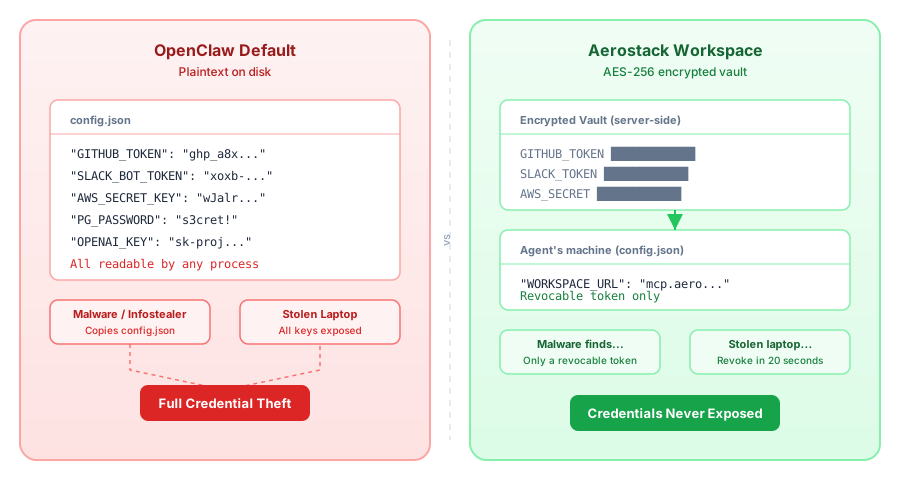
Instead of storing credentials on the machine and having the agent access them directly, we moved the credentials into the Aerostack Workspace vault. They're stored AES-256 encrypted, server-side, and the agent never sees them in plaintext.
Here's how it works:
You add an API key to your Workspace (encrypted at rest in the vault)
Your agent connects to the Workspace URL with a token
When the agent needs to call an API, it doesn't fetch the key directly—it calls a tool through the Workspace
The Workspace looks up the credential, makes the API call server-side, and returns the result
The agent never handles the raw credential. If someone compromises the machine, they get the Workspace token (which is revocable and has no standalone value) not the actual API keys.
If they steal the laptop or malware copies process memory, the attacker finds cached API responses, maybe some local state, but not your credentials.
It Doesn't Have to Be All or Nothing
You don't need to adopt a whole new platform to fix this. The pattern is what matters: credentials should live somewhere the agent can't access them directly.
Some ideas:
Proxy service — run a local credential service (even a simple one) that the agent calls instead of reading files
OS keystore — use your platform's native credential storage (Keychain on macOS, Credential Manager on Windows, pass on Linux)
Hashicorp Vault — if you're already running it, store OpenClaw credentials there and have the agent request them on startup
KMS provider — AWS Secrets Manager, Azure Key Vault, Google Cloud Secret Manager all have local caching and access control
The point is: don't let the agent hold the plaintext key.
The Habit to Break
Even if you're not worried about targeted attacks by infostealer crews, plaintext credentials are a bad habit. It's the kind of shortcut that seems fine until it isn't — and by the time it isn't, you're rotating every key in your infrastructure at 2 AM.
At minimum:
Rotate your API keys regularly — quarterly at least, immediately if you suspect compromise
Use environment variables instead of committing credentials to config files
Ask the real question: does my agent really need to see the raw credentials at all? Usually the answer is no. The agent needs to use a service, not hold the key.
If you're building on OpenClaw and using external APIs, consider whether you can move the credential injection elsewhere. Your future self will thank you.
See how Aerostack handles secrets: aerostack.dev
Part of the Agent Operations series. Start with the full guide: "I Run 5 MCP Servers on OpenClaw"