Every MCP Tool Your OpenClaw Agent Can Access (And Which Ones You Should Block)
Part of the Agent Operations series. [Start with the full guide: "I Run 5 MCP Servers on OpenClaw"](/openclaw-series/01-flagship-complete-guide).
I sat down one afternoon and listed every tool my 5 MCP servers expose to my OpenClaw agent. The list scared me.
35 total tools across Postgres, GitHub, Slack, AWS, and GCP. Most of them were dangerous. Not malicious-by-design dangerous—just unrestricted. My agent could delete a GitHub repository. Drop a production database table. Terminate AWS instances. Remove users from Slack.
The problem wasn't that OpenClaw is insecure. It's that the default setup assumes you trust your agent completely. And if your agent gets compromised—or if you're running it on behalf of other teams—that trust becomes a liability.
The Full Audit
I'll walk through each server and categorize what your agent can do. This isn't exhaustive, but it covers the real risks.
Postgres MCP
Safe tools (read-only operations):
query— SELECT statements, no writeslist_tables— table names and metadatadescribe_table— schema, column types, constraints
Caution (writes, but contained):
insert— add rowsupdate— modify existing data
Dangerous (destructive or uncontained):
delete— remove rows (no undo)execute— arbitrary SQL (could drop tables, disable constraints, modify functions)drop_table— permanent table deletion
The execute tool is the real problem. It bypasses the semantic safety of insert and update. If your agent is compromised or misbehaves, one execute call can wreck your schema.
GitHub MCP
Safe tools:
get_file_contents— read code, configs, docslist_issues— see what's open, closed, or assignedsearch_code— keyword search across repos
Caution:
create_branch— new branches (someone has to merge them)create_pull_request— PRs (requires review before merge, usually)
Dangerous:
merge_pull_request— bypass code review, push straight to maindelete_repository— gone foreverupdate_branch_protection— disable your own safeguards
This one surprised me. Most teams don't realize that merge_pull_request exists as a discrete tool. Your agent can bypass human review entirely. That's a bigger risk than a bad commit.
Slack MCP
Safe tools:
list_channels— see public channelsread_messages— historical data, no writessearch_messages— find things
Caution:
post_message— send messages (harmless if your agent has good judgment)upload_file— attach files (could be abused for spam or phishing)
Dangerous:
delete_message— remove evidence, spam, or gaslight usersremove_user— kick people off the workspacedelete_channel— nuke an entire channel and its history
Most Slack compromises aren't about deletion. They're about impersonation and miscommunication. Your agent could post as itself, but it could also confuse people or spam channels. The delete tools are worse—they're silent and irreversible.
AWS / GCP MCP
Safe tools:
describe_instances— see running VMsview_metrics— cloudwatch, monitoring dataread_configs— non-sensitive config inspection
Caution:
create_instance— spin up new resources (costs money, but contained)modify_tags— metadata changes
Dangerous:
terminate_instances— shut down productiondelete_bucket— S3 data gonemodify_security_groups— open ports, expose networkschange_iam_policies— escalate permissions or lock out legitimate usersdownload_secrets— exfiltrate API keys, database passwords, credentials
The cloud tools are the most serious. One bad call and your entire infrastructure can be offline or compromised. Most of these are operations you'd never give to an automated script. But OpenClaw will if you don't explicitly block them.
The Read-Only Agent Pattern
Here's a practical approach that actually works: enable only the read-only tools on each server, then audit whether you really need write access.
For most of my workflows, I don't. My agent:
Reads from Postgres to understand the current state
Searches GitHub to find relevant code
Lists and reads Slack messages to context-load conversations
Checks AWS metrics to understand resource usage
That's 80% of what I needed it to do. I never actually needed it to write to production. When writes are necessary, I have the agent prepare the change, then I review and execute it manually.
Start there. Build with read-only. Add writes later, tool by tool, only when you've proven you need them.
Why OpenClaw Doesn't Solve This Natively
This isn't a flaw in OpenClaw. It's a design trade-off. OpenClaw's security model works at the MCP server level: you can mount a server or not, but you can't selectively enable or disable individual tools within that server.
That makes sense for a gateway. The MCP spec doesn't have tool-level access control. OpenClaw treats each server as an atomic unit of trust.
So if you want to use Postgres—even just for reads—you have to expose all Postgres tools. Same for GitHub, Slack, and AWS. All or nothing.
Community Workarounds
Teams have solved this in a few ways:
Separate instances. Run two Postgres instances—one read-only, one read-write. Mount the read-only one to your agent. This works, but it's operationally heavy.
Custom proxy middleware. Wrap your MCP server in a thin proxy layer that accepts tool calls and filters them. Allows query and list_tables, blocks execute and delete. Works well but requires maintenance.
Forking MCP servers. Remove dangerous tools from the source code and run your own fork. Fine if you control the MCP source, annoying if you don't.
All of these work. None of them scale. You need one per server, per security posture.
What We Built
Full disclosure: I'm the founder of Aerostack. We built a workspace that lets you toggle tools on and off through a dashboard. No code changes. No extra infrastructure.
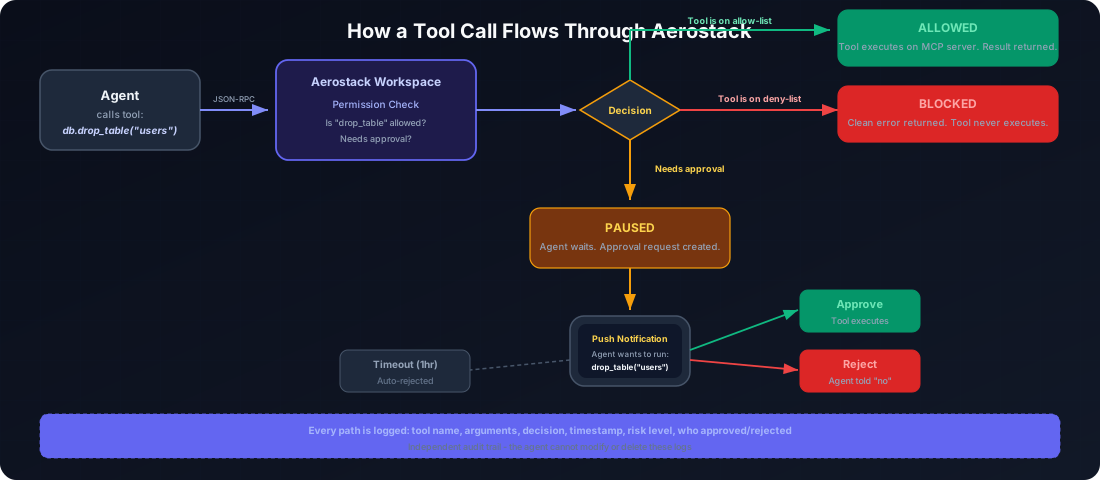
You mount your 5 MCP servers once. The workspace reads their tool definitions. You see every tool. You click "block" next to the ones you don't trust, then deploy. Your agent can't call blocked tools—they don't show up in its context.
In my case, I kept only the tools I actually need enabled. I kept query, list_tables, and describe_table from Postgres. get_file_contents, list_issues, and search_code from GitHub. list_channels, read_messages, and search_messages from Slack. Everything else, blocked.
The workflow changed my thinking about agent safety. Instead of "which MCP servers can I trust," it became "which specific capabilities do I actually need?" That's a much more tractable problem.
The Minimum You Should Do
You don't need Aerostack to do this. But you do need to do something.
At minimum: go through your MCP servers and make a list of every tool they expose. Just knowing what your agent has access to is step one. Don't be surprised later.
Then ask: does my agent actually need to call this? For every tool you can answer "no" to, disable it. Use a proxy, fork the source, run separate instances—whatever your constraints allow.
The assumption that your agent is benevolent and immune to compromise is the most dangerous one you can make. Accidents happen. Agents misbehave. Attackers find exploits. And when they do, the blast radius is exactly as large as the set of tools your agent had access to.
Tool-level access control isn't glamorous. It's the kind of boring security work that never makes the changelog. But boring security work is why your infrastructure is still standing six months from now.
Start building with tool-level control: aerostack.dev
Part of the Agent Operations series. Start with the full guide: "I Run 5 MCP Servers on OpenClaw"