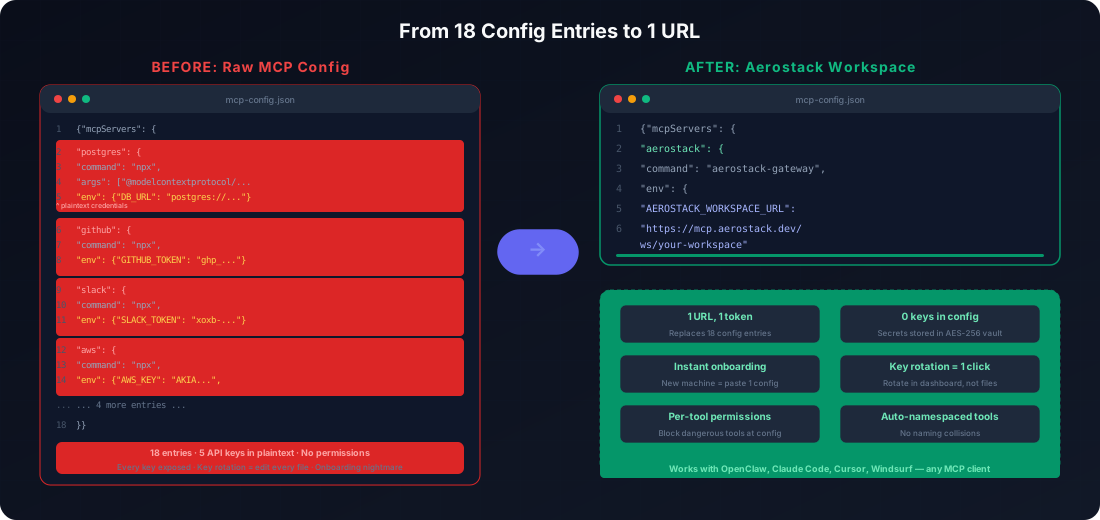
I counted. Eighteen config entries across 5 MCP servers, five different API keys, three different auth methods. Every time I set up a new machine or onboard someone, it takes a couple of hours to get everything right. One wrong key and the agent silently fails on half its tools. That number should tell you something.
This post is about the simplest structural fix for that problem: running all your MCP servers through a single Aerostack workspace. It doesn't require any new tooling beyond what you're already using if you're running OpenClaw as your computer use agent. And it changes the maintenance calculus entirely.
The Config Sprawl Problem
When you're running multiple MCP servers on OpenClaw, each one carries its own configuration block. The postgres server needs PG_CONNECTION_STRING. GitHub needs GITHUB_TOKEN. Slack needs both SLACK_BOT_TOKEN and SLACK_APP_TOKEN. That's five separate credential namespaces to track manually.
{
  "mcpServers": {
    "postgres": {
      "command": "mcp-postgres",
      "env": { "PG_CONNECTION_STRING": "postgresql://user:pass@localhost:5432/db" }
    },
    "github": {
      "command": "mcp-github",
      "env": { "GITHUB_TOKEN": "ghp_..." }
    },
    "slack": {
      "command": "mcp-slack",
      "env": { "SLACK_BOT_TOKEN": "xoxb-...", "SLACK_APP_TOKEN": "xapp-..." }
    },
    "aws": {
      "command": "mcp-aws",
      "env": { "AWS_ACCESS_KEY_ID": "AKIA...", "AWS_SECRET_ACCESS_KEY": "..." }
    },
    "internal": {
      "command": "mcp-internal",
      "env": { "API_KEY": "sk_...", "API_URL": "https://api.internal.dev" }
    }
  }
}
Now multiply the maintenance burden across every machine, every teammate, and every rotation cycle. I've run into all four of these failure modes personally.
Key rotation: When GitHub invalidates your token, you update the config on your laptop. But your colleague has the same config on their machine. And the CI/CD system. And the staging agent. And production. That's five places to remember. Miss one and that agent fails silently.
New machine setup: Onboarding a new team member means copying this entire config structure and filling in all five credential sets. Every credential sits in plaintext in a config file, and copy-paste errors are inevitable at that volume.
Tool naming collisions: If two of your MCP servers both define a tool called search, there's no automatic namespacing. You'll coordinate tool names across five separate projects, or the agent picks the wrong one and you won't know until something breaks.
No central inventory: There's no single view of what tools are actually available. Did you enable the GitHub search tool? Is Slack actually connected? You have to dig into each config block to know what's live. I've lost 30-minute debugging sessions to this exact issue.
The Workspace-as-Proxy Pattern
Full disclosure: I built Aerostack, and config sprawl was the first problem I wanted to solve when designing the OpenClaw integration.
Instead of managing credentials in OpenClaw directly, you proxy all your MCP servers through a single Aerostack workspace. The workspace stores credentials in an encrypted vault, auto-namespaces tools to prevent collisions, and hands you back one URL and one token.
From OpenClaw's perspective there's now only one MCP server to manage: the workspace itself.
{
  "mcpServers": {
    "aerostack": {
      "command": "aerostack-gateway",
      "env": {
        "AEROSTACK_WORKSPACE_URL": "https://mcp.aerostack.dev/ws/my-workspace",
        "AEROSTACK_TOKEN": "your-workspace-token"
      }
    }
  }
}
That's it. One config block. When the agent calls postgres__query, the workspace routes it to postgres with the correct credentials. When it calls github__search, it goes to GitHub. Slack tokens are injected automatically. The agent never sees them.
Decentralized vs Workspace Config: What Actually Changes
| Decentralized (per-server config) | Workspace (centralised) | |
|---|---|---|
| Config entries for 5 servers | 18+ env vars across 5 blocks | 2 env vars (URL + token) |
| Key rotation | Update every machine manually | Update once in dashboard, all agents get it |
| Tool naming | Manual coordination across projects | Auto-namespaced (postgres__query) |
| New machine setup | Collect all 5 credential sets | Copy workspace URL + token |
| Team onboarding | Share credentials via Slack or email | Workspace invite link, no credential sharing |
| Tool inventory | Dig into each config block | Single dashboard view across all servers |
| Audit trail | None (local config file) | Per-credential access log in dashboard |
The Practical Wins
This isn't just fewer lines of JSON. It changes how you operate day to day, and I've noticed each of these improvements since switching.
Key rotation becomes instant. You update the credential in the Aerostack dashboard once. Every agent that uses that workspace gets the new token immediately. There's no config file update, no machine-by-machine rollout.
Onboarding scales. When you bring someone onto the team, you send them an invite link to the workspace. They inherit access to all your MCP servers with one click. No credential sharing, no copy-paste risk. They plug the workspace URL and token into their OpenClaw config and they're ready.
Tool inventory becomes visible. The Aerostack dashboard shows every tool across all your servers. You can see what's connected, what's working, what isn't, and toggle individual servers on and off without touching config files.
Credentials stay out of plaintext. The biggest security gain isn't clever. It's just that your API keys aren't sitting in a config file on five different machines. If you haven't read about the exposed-instance risk yet, the AI agent security risks post covers what happens when agents run with plaintext credentials and no access controls.
Audit trail included. The workspace logs every time a credential is used or rotated. If you need to know which agent accessed GitHub at 3 am, you've got that record. For teams running approval gates, like the pattern described in the accidental deletion guardrails post, the audit trail integrates directly with the activity feed.
Credential rotation scales. If you're rotating AWS keys on a regular security cadence, you update them in the workspace. All agents get the new keys without any downtime or config file coordination.
When You Actually Need This
This pattern is overkill if you've got one MCP server. It's a nice-to-have at two. By five it's essential. You'll know it's time when any of these apply:
- You're managing more than 2 MCP servers
- Multiple machines or agents share the same server set
- Team members need access to the same tools
- Credentials rotate on any cycle (monthly, per-incident)
- You've had even one silent auth failure you couldn't diagnose in under 5 minutes
Once you've consolidated config, the natural next step is monitoring what your agents are actually doing. The activity monitoring and risk levels post covers what the real-time feed looks like after you've wired up the workspace. I'd read it in sequence with this one.
Workspace Config Inside a Broader Agent Management Setup
Config simplification is one piece of the larger problem of running agents reliably. If you haven't set up agent lifecycle management yet, the complete OpenClaw agent management guide covers the full picture: spawning, pausing, watching which tools an agent is actually calling. Workspace consolidation is step one. It isn't the whole job.
Once credentials are consolidated and agents are instrumented, the remaining gap is usually access control: who can do what, and what needs a human approval before it runs. That's what the exposed instances and MCP tool permissions post covers. It's the security layer that goes on top of the workspace pattern described here, and it's worth reading together with this post.
The config simplification saved me more time than any of the other security or token optimisation improvements in this series. Not because it is clever, but because I stopped doing repetitive maintenance and started doing actual work. Debugging a silent auth failure at midnight is a rite of passage for anyone running multiple MCP servers. You do not want it to become a recurring event. That is what good infrastructure should do. It disappears, and you get on with the work.
Frequently Asked Questions
What is an AI agent workspace setup?
An AI agent workspace is a centralised configuration layer that proxies multiple MCP servers behind a single URL and credential pair. Instead of managing separate API keys and config blocks for each server, the workspace stores all credentials in an encrypted vault and exposes one endpoint to your agent client (OpenClaw, Claude Desktop, and others).
Does workspace consolidation work with OpenClaw specifically?
Yes. OpenClaw accepts any MCP-compatible server URL. You replace your per-server config blocks with a single Aerostack gateway block pointing to your workspace URL and token. All tool calls are routed transparently and the agent doesn't know it's talking to a proxy.
What happens if I need different permissions for different agents?
Aerostack workspaces support per-agent access scopes. You can give agent A access to GitHub plus Slack and agent B access to postgres plus internal APIs, all from the same workspace with different tokens. The credential vault is shared but access is scoped per-token.
Is this just for OpenClaw or does it work with other agent clients?
The workspace pattern works with any MCP-compatible client: Claude Desktop, Cursor, Windsurf, and others. The Aerostack workspace exposes a standard MCP endpoint so the client doesn't need to know anything about the consolidation layer.
How does tool namespacing prevent collisions?
When you add MCP servers to a workspace, Aerostack prefixes each server's tools with the server name: postgres__query, github__search, slack__send_message. If two servers define a tool called search, the agent sees github__search and internal__search with no ambiguity.
Do I need to change anything in my agent prompts after consolidating?
Only if you're referencing specific tool names in your prompts. Since tools are now namespaced (postgres__query instead of query), you'll want to update any prompt that hard-codes tool names. For agents that discover tools dynamically, there's nothing to change.