TL;DR: OpenClaw gives your AI agent access to everything — Postgres, GitHub, Slack, AWS — with no permission boundaries, no audit trail, and no approval workflow. I run 5 MCP servers daily. After my agent deleted staging data from an ambiguous instruction, I built a management layer that adds per-tool permissions, approval gates, independent audit logging, topic-separated conversations for token savings, and mobile approval from my phone. Here's exactly how it works.
OpenClaw is the most popular computer use agent platform in use today. This computer use agent management guide covers the complete ai agent management stack you need to run it safely in production.
I've been running OpenClaw since the Clawdbot days. Postgres, GitHub, Slack, AWS, and a custom internal tool, five MCP servers, all connected, all feeding into one Telegram thread. The agent handles everything from deploying services to drafting blog posts. I basically live in that thread.
And then it deleted my staging data.
I'd told it to "clean up the staging environment." I meant Docker containers. It ran DELETE FROM staging_orders WHERE status = 'pending'. The Postgres MCP gave it full access, why wouldn't it? I never told it not to. There was no approval step. No confirmation. No log I could check afterward to figure out exactly what went wrong.
Honestly, I should have seen this coming. Looking at the OpenClaw Discord and GitHub issues, this kind of thing happens more than anyone admits.
The State of OpenClaw Security in April 2026
I don't want to be alarmist about this. But the numbers are bad:
- 42,000+ OpenClaw instances exposed on the public internet. Bitsight and multiple security firms have confirmed this. Most running with default security settings, no gateway token, exposed API endpoints.
- 824 malicious skills found on ClawHub. 1Password's security team documented credential stealers, reverse shells, and keyloggers planted in the skill marketplace. Kaspersky confirmed that RedLine and Lumma infostealers have already added OpenClaw file paths to their target lists.
- 6 CVEs in 2026 alone. Including CVE-2026-25253 (CVSS 8.8), a one-click remote code execution flaw. Cisco's security blog called personal AI agents like OpenClaw "a security nightmare."
- Gartner's assessment: "A dangerous preview of agentic AI, demonstrating high utility but exposing enterprises to 'insecure by default' risks like plaintext credential storage."
- Microsoft, Cisco, and Meta have published internal warnings or bans.
I read all of this and still kept running my agent with every tool enabled for another two weeks. We're all guilty of this.
Problem 1: Your Agent Has Root Access to Everything
I didn't fully understand this until I sat down and listed every tool my MCP servers expose. Try it yourself, it's eye-opening.
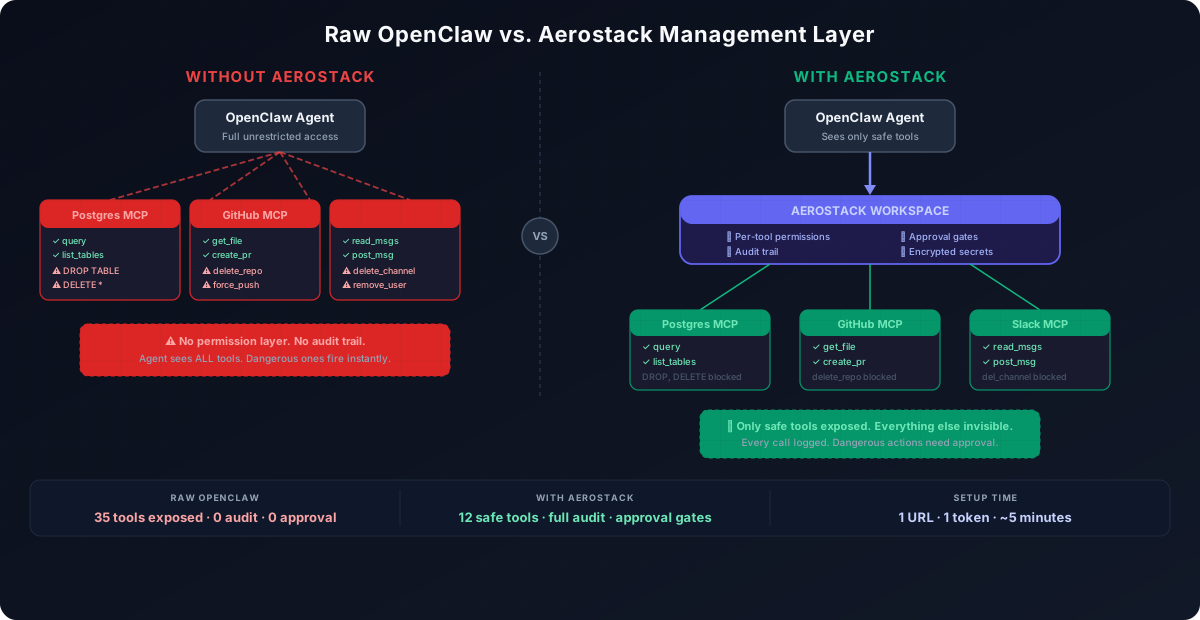
Postgres MCP exposes: query, insert, update, delete, execute (arbitrary SQL), drop_table, list_tables, describe_table. Your agent can read your database. It can also DROP TABLE users, DELETE FROM orders WHERE 1=1, or run UPDATE accounts SET balance = 0. All of these are valid tool calls.
GitHub MCP exposes: get_file_contents, create_branch, create_pull_request, merge_pull_request, delete_repository, update_branch_protection. Your agent can read code. It can also delete your entire repository, force push to main, or change branch protection rules.
Slack MCP exposes: list_channels, read_messages, post_message, delete_message, remove_user, delete_channel. Your agent can search Slack. It can also send messages as you to any channel, delete channels, or remove people from your workspace.
AWS/GCP MCP exposes: describe_instances, terminate_instances, delete_bucket, modify_security_groups, change_iam_policies, download_secrets. Your agent can monitor your infrastructure. It can also terminate production instances, delete S3 buckets, open firewall ports, or download secrets from your vault.
See the pattern? Safe tools and destructive tools live side by side, and your agent doesn't know the difference. It'll use whatever gets the job done. If drop_table is available and the agent thinks dropping a table is the right move, it drops the table.
What the community is doing about it
OpenClaw doesn't have per-tool permissions. The gateway gives you all-or-nothing: either an MCP server is connected or it isn't. You can't say "give my agent query but not drop_table" on the same Postgres server.
I've seen three workarounds in the community:
- Separate instances. Run one OpenClaw for read-only work with only safe MCPs, another for writes. Janky, but it works. Managing multiple instances gets old fast.
- Custom middleware. Some people are writing proxy layers. It's doable if you have the time. Most of us don't.
- Mission Control. Will Cheung's open-source project adds audit logging after the fact. Useful for understanding what happened, but it doesn't prevent anything.
What I ended up building
(Full disclosure: I'm the founder of Aerostack, so take this with appropriate salt. I built the thing because I needed it.)
I wanted something between my agent and my MCP servers that lets me say: "Postgres, enable query and list_tables, block everything else." Same for GitHub: get_file_contents and create_pull_request yes, delete_repository absolutely not.
Aerostack Workspaces does this. You add your MCP servers to a workspace, toggle individual tools on or off per server, and the workspace gives you one URL. Your agent connects to that URL instead of the raw MCP servers. It only sees the tools you've enabled. Blocked tools don't exist in its world, it gets a clean error, the action never runs.
The setup looks like this in your OpenClaw MCP config:
{
  "mcpServers": {
    "aerostack": {
      "command": "aerostack-gateway",
      "env": {
        "AEROSTACK_WORKSPACE_URL": "https://mcp.aerostack.dev/ws/your-workspace"
      }
    }
  }
}
One entry replaces all your individual MCP server configs. The workspace handles routing, permissions, and secrets (AES-256 encrypted, not plaintext like OpenClaw's config files).
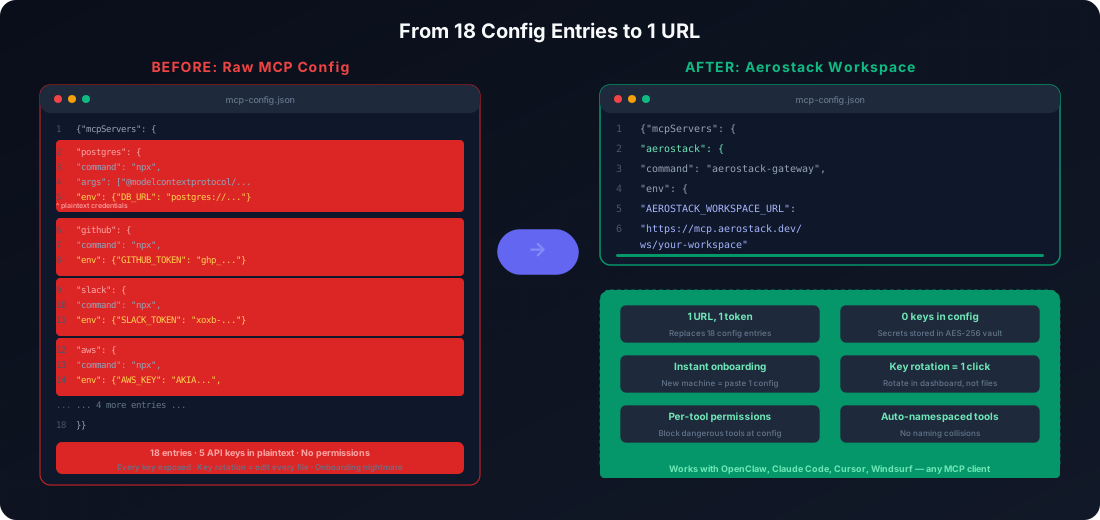
In my case, I went from 18 config entries and 5 API keys scattered across files to 1 URL. My agent sees only the tools I've explicitly enabled, the dangerous ones simply don't exist in its context.
AI Agent Cost Control: Token Costs Are Out of Control
Nobody tells you about this when you start. My first month's API bill was... educational.
There's a whole ecosystem of content about this: Apiyi published a breakdown of the 6 core reasons ("Why is OpenClaw so token-intensive?"), Tom Smykowski wrote a Medium post about cutting his bill by 90%, and GitHub issue #5431 is a feature request for a "Context Optimizer" citing the need for 30-70% token cost reduction. LaoZhang AI published a guide claiming 50-80% reduction is possible.
Why it happens:
Session history grows indefinitely. Every message, every tool output, every agent response accumulates in the context window. When you ask your agent a question at 3pm, it's sending the full conversation history from 9am with it, including that massive git diff output, the database query results, and the three failed deployment logs.
If you're using Claude (most OpenClaw users are), the input token cost at the Sonnet tier is about $3 per million tokens. A conversation that's accumulated 60,000 tokens of history costs ~$0.18 per message just for context. At 50 messages a day, that's $9/day or $270/month, almost entirely on stale context that's irrelevant to your current question.
What the community recommends
The standard advice is:
- Reset sessions regularly (lose context but save tokens)
- Switch to cheaper models for simple tasks
- Limit bootstrap file sizes (
agents.defaults.bootstrapMaxChars) - Use heartbeat to keep cache warm and avoid re-caching
- Enable cache-TTL pruning for idle sessions
These all help. But they're workarounds for the fundamental issue: one long conversation accumulates irrelevant context.
What actually solved it for me
The biggest win wasn't any of the above. It was separating conversations by topic.
Instead of one Telegram thread where DevOps, marketing, coding, and database tasks all live together, I use Aerostack's Agent Chat to run separate conversations. One for DevOps work. One for content. One for code.
Each conversation maintains its own isolated context. When I ask about a deployment in the DevOps thread, the agent only sees DevOps history, about 4,000 tokens instead of 60,000. The marketing drafts, the CSS bug discussion, the database migration thread, none of that is in context.
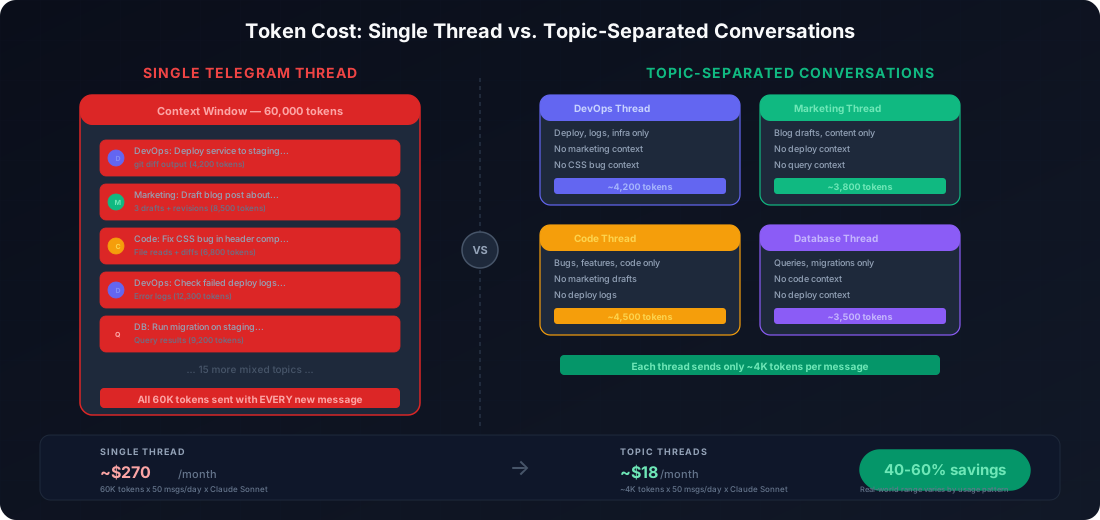
The math:
Setup | Tokens per message | Monthly cost (50 msgs/day)
Single thread (Telegram) | ~60,000 | ~$270
Topic-separated threads | ~300,00 | ~$135
On paper that's a 50% reduction, but I want to be honest — real-world savings depend on how many conversations you run and how much you switch between them. In practice I'm seeing something like 30-50% lower costs. Still significant. The OpenClaw docs themselves recommend "splitting tasks into separate sessions" — I just made that structured instead of doing it manually every time I noticed my context was bloated.
Problem 3: You Can't Share Your Agent With Your Team
This one hit me when I tried to let my co-worker use the agent. GitHub issue #8081 is a feature request for multi-user RBAC — 200+ thumbs up, still open. Someone in the Discord put it bluntly: "OpenClaw is not tuned for the multi-user use case."
They're right. The problems:
- Context collisions. When two people use the same agent, their tasks, histories, and instructions intermingle. Your DevOps engineer's deployment context bleeds into your marketing person's content context.
- No permission boundaries. Everyone with access to the system can view and modify API keys, credentials, and configurations. There's no "read-only" access.
- Performance bottlenecks. OpenClaw has single-threaded pinch points. Multiple users sending requests creates contention.
The recommended community approach is to run separate OpenClaw instances per person. That works, but now you're managing multiple instances, multiple configs, multiple sets of MCP connections, and multiple sets of credentials.
How I got around this
Since I was already using an Aerostack Workspace for permissions, adding team access was straightforward. The workspace supports multiple members, each with their own conversations. My co-worker talks to the agent in his threads, I talk in mine. His deployment discussion doesn't pollute my coding context.
The workspace supports role-based access:
- Admin: full access. Manage servers, permissions, tokens, team members.
- Member: use all enabled tools, create conversations. Cannot change permissions or server configs.
Onboarding a new teammate takes under a minute, just an invite link. They inherit the workspace's permission settings automatically, so they can only use the tools you've already approved.
Problem 4: You Have No Idea What Your Agent Actually Did
This one keeps me up at night. From a DEV Community audit:
"OpenClaw's logs are exclusively local. Combined with an agent with filesystem access, this facilitates post-compromise defense evasion and eliminates historical audit capability."
Read that again. Your agent has filesystem access. Your logs are local files. Your agent can delete its own logs. There is no independent audit trail.
The community has built tools to address this:
- OpenClaw Mission Control (open source by Will Cheung), a self-hosted dashboard that adds audit logging
- OpenClaw Dashboard (by tugcantopaloglu), real-time monitoring with cost tracking and memory browsing
- openclaw.watch, token monitoring and cost analytics
These are solid projects and I've used Mission Control myself. But they all share a limitation: they're retrospective. They tell you what happened. They don't stop anything before it happens.
What I wanted: real-time visibility + prevention
I needed two things:
- A real-time activity feed that shows every tool call as it happens, with risk levels, so I can see
rm -rf ./old-data/flagged as CRITICAL before it completes. - An approval gate that pauses the agent on dangerous actions and waits for my explicit "go ahead" — from my phone if I'm away from my desk.
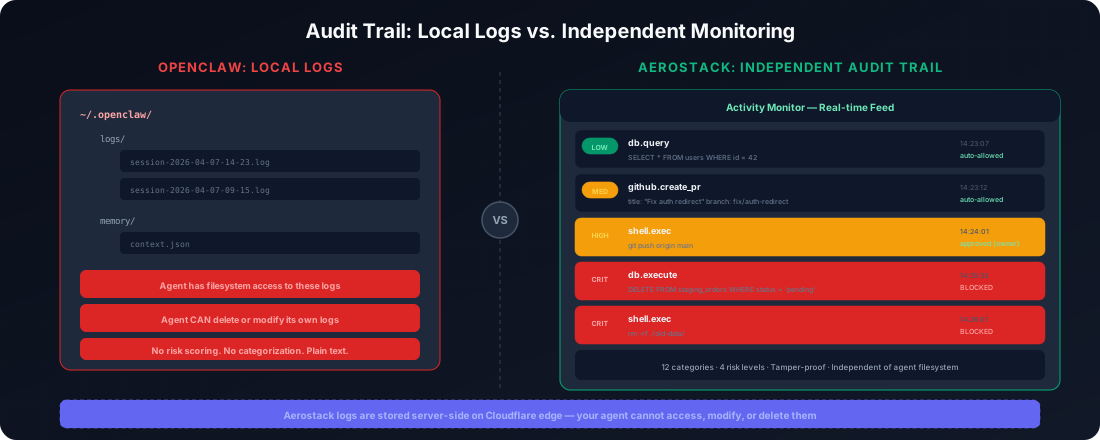
Aerostack's Activity Monitor gives me the first one. Every tool call is logged with timestamps, risk levels (low/medium/high/critical), the exact arguments passed, and which AI client made the call. It's not local logs. It's a persistent, independent audit trail that the agent can't tamper with.
The approval system gives me the second. I've configured it so that shell commands, file deletes, and deployments require my approval. Everything else (reads, queries, searches) auto-proceeds. When the agent hits a restricted action, it pauses. I get a push notification on my phone:
Agent wants to run: git push origin main
I tap, see the full command and context, and approve or reject. The whole flow takes about 5 seconds from notification to decision. If I'm in a meeting and don't respond, the approval expires after an hour — it never executes by default.
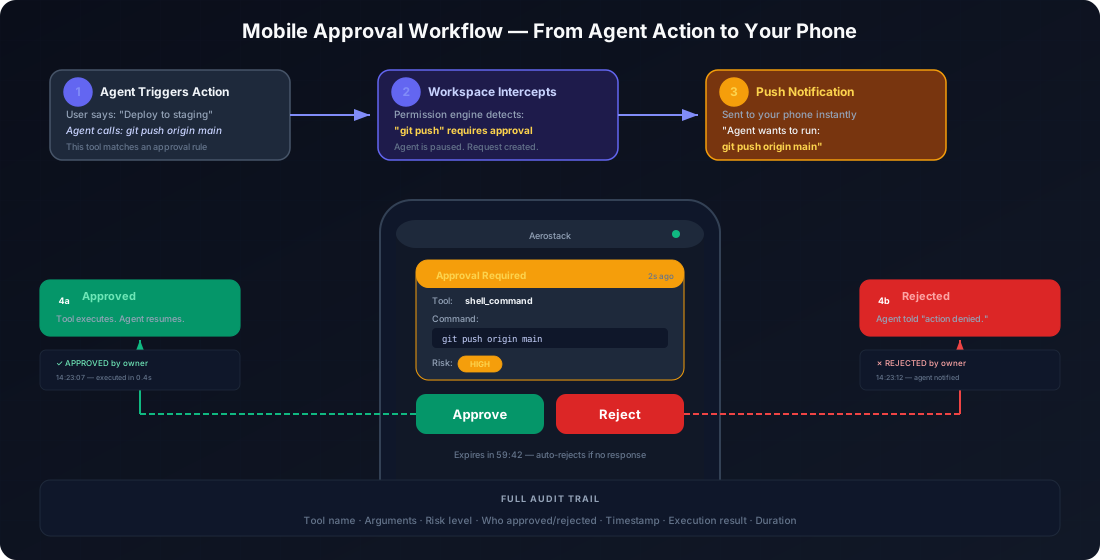
The activity feed tracks 12+ event categories: command execution, file writes, file deletes, API calls, package installs, config changes, deployments, message sends, data access, credential use, tool calls, and approvals. Each one is risk-scored independently of what the agent reports.
Mobile Approval Workflow: Approve Agent Actions in 5 Seconds From Your Phone
This might sound minor compared to the security stuff, but it's practical. My agent runs while I'm in meetings, at lunch, commuting. If it needs approval for a deployment and I'm away from my desk, what happens? It just... waits. For an hour. Then the approval expires.
I built a mobile app for this (Flutter, iOS and Android). The basics: pending approvals show up as push notifications, I swipe to approve or reject, done. The thing I use most is actually the activity feed — scrolling through what my agent did in the last hour while I was in a call.
One time the activity feed showed a sudden burst of API calls I didn't recognize. I panicked, opened the token management screen, and revoked the workspace token. Turned out to be the agent in a retry loop on a flaky API — nothing malicious. But the fact that I could kill access in 5 seconds from my phone while standing in line for coffee? That's the kind of safety net that changes how comfortable you are letting an agent run autonomously.
The Full Setup, End to End
Add per-tool permissions, approval gates, and audit logging to your OpenClaw agent. Connect any MCP server through Aerostack Workspaces in 5 minutes.
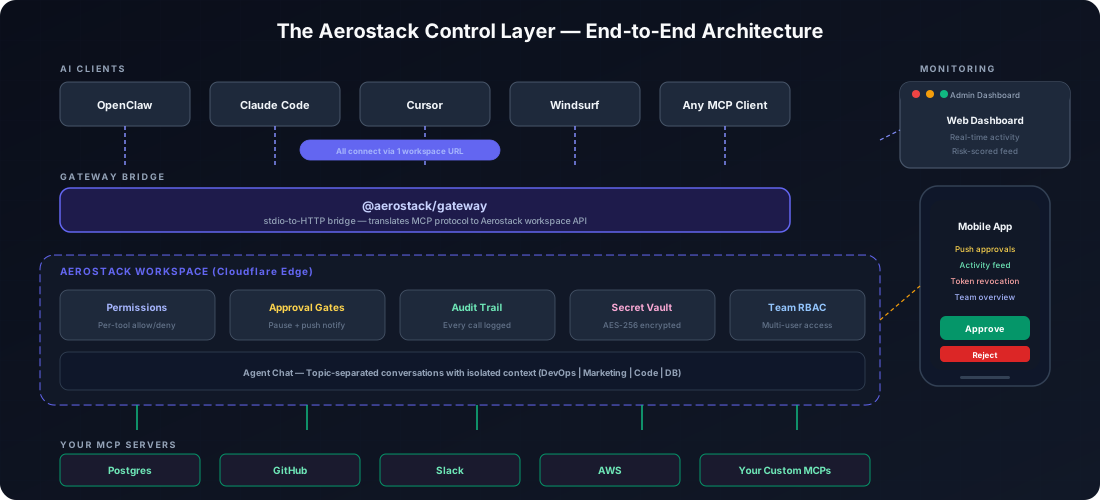
If you want to try this setup, here's the short version:
- Create a workspace at aerostack.dev (free, no credit card). Add your MCP servers. Toggle individual tools on/off per server.
- Install the gateway bridge:
npm install -g @aerostack/gateway- Replace your OpenClaw MCP config with the single workspace entry (shown above).
- Open Agent Chat in the dashboard. Create topic-based conversations for your different work areas.
- Set approval rules. Enable approvals for shell commands, file deletes, and deployments. Leave reads and queries on auto-allow.
- Download the mobile app. Enable push notifications. Set up your approval preferences.
- Invite your team if applicable. They inherit workspace permissions automatically.
Total time: about 5 minutes. The free tier includes 10 projects, 3 workspaces, 50K API requests/month, and 500K AI tokens.
What This Gives You vs. Raw OpenClaw
| Raw OpenClaw | With Aerostack Management Layer | |
|---|---|---|
| Tool access | Every MCP tool unrestricted | Per-tool allow/deny with risk categories |
| Conversations | One thread, all topics mixed | Separate topics, isolated context |
| Token cost | ~60K tokens/msg ($270/mo) | ~8K tokens/conversation ($18/mo) |
| Team access | Single user, no roles | Multi-user with Admin/Member roles |
| Approval control | None — agent acts immediately | Configurable per action type |
| Visibility | Local logs (agent can delete) | Independent audit trail with risk levels |
| Mobile management | None | Full app: approve, monitor, revoke |
| Credential storage | Plaintext in config file | AES-256 encrypted vault |
The Bigger Picture
I'm not going to pretend OpenClaw is broken — I use it every day and it's the most useful tool I've adopted in years. 247,000 GitHub stars aren't wrong. But the management and security story hasn't caught up with what the agent can actually do. The community sees it too — that's why Mission Control, OpenClaw Dashboard, and a dozen other projects exist.
My take: the agent itself is great. The missing piece is the control layer around it. Whether you build your own, use Aerostack, or wait for OpenClaw to add native features — the important thing is to not run production MCP servers without some kind of permission and monitoring layer. I learned that the hard way with my staging database.
Your AI Agent Management Checklist
If you take nothing else from this post, use this as your ai agent management baseline. It covers the five control layers every OpenClaw user with production MCP access should have in place before running anything they care about.
- Per-tool permission rules: reads auto-allowed, writes and deletes require explicit approval
- Topic-separated conversations: one thread per work area, not one thread for everything
- Independent audit trail: stored outside the agent's reach so it cannot be deleted or modified
- Mobile approval workflow: push notifications with approve/deny from your phone
- Encrypted credential storage: no plaintext API keys or database passwords in config files
Related: AI agent activity monitoring and risk levels · accidental deletion approval gates · exposed instance security risks
Frequently Asked Questions
What is AI agent management and why does it matter?
AI agent management is the practice of controlling what your AI agent can do, can access, and has already done. When you connect an AI agent to MCP servers — databases, code repos, cloud services — it gets broad permissions by default. Without a management layer there is no way to restrict which tools it uses, no approval step before destructive actions, and no independent audit log. The result is exactly what happened to me: an ambiguous instruction led to deleted staging data with no record of what went wrong. Management turns an unconstrained agent into a controllable system.
Does OpenClaw have built-in agent management features?
OpenClaw does not have native per-tool permission controls, approval gates, or independent audit logging as of mid-2026. The community has built workarounds like Mission Control and OpenClaw Dashboard, but these are not official features. The core platform assumes you trust the agent completely, which works fine for personal use with low-risk tools but breaks down when you are connecting production databases, payment systems, or team-shared infrastructure.
How do I set up a management layer for my OpenClaw agent?
The fastest path: connect your MCP servers to Aerostack Workspaces instead of directly to OpenClaw. This gives you per-tool permission rules, topic-separated conversations to cut token costs, an audit trail your agent cannot modify, and mobile approval from your phone. Setup takes about 5 minutes. Add your workspace URL as the MCP endpoint, set your approval rules, and you are done. The agent experience is identical from the user perspective; the management layer sits transparently between OpenClaw and your tools.
What is the real cost of running OpenClaw without token optimization?
With 5 MCP servers and a single shared conversation thread I was hitting 60,000 tokens per message as the context window filled with every tool schema and prior conversation history. At $270 per month that is not alarming, but it compounds fast with a team. Splitting into topic-separated conversations drops the context per message to around 8,000 tokens. That is the $18 figure: same work, 93 percent less cost, because each conversation only loads what it needs.
Is it safe to connect a database to an AI agent like OpenClaw?
It depends entirely on what permissions you grant the database MCP. The raw OpenClaw setup gives the agent full database access: reads, writes, deletes, schema changes. That is fine for a dev database you do not care about and a serious problem for anything with production data. The minimum viable safety setup is read-only access by default, explicit approval required for any write or delete operation, and an audit log outside the agent reach. With those three things in place the agent can still do useful work while you retain meaningful control.
How does the mobile approval workflow work for AI agents?
When your agent attempts a restricted action — a deployment, file delete, or database write — the management layer pauses execution and sends a push notification to your phone. Tap to see the full command and its context, then approve or reject with one tap. If you do not respond within the timeout window (default: one hour), the action expires and never auto-executes. The whole flow takes about 5 seconds from notification to decision, so you can manage your agent from meetings, commutes, or anywhere you have your phone.